


 Français
 English
 Español
 Deutsch
 Italiano
How to configure the "Pointdev Remote Control" client part (admin computer)?
How to configure the "Pointdev Remote Control" client part on the admin computer and have access to the list of remote computers?
Here are the steps to configure the client part of Pointdev Remote Control:
- Add a new tab "Remote control over the Internet" in the right view of the software. Name the tab (for example by indicating the name of the remote site) and add an optional description.
- Configuration of parameters
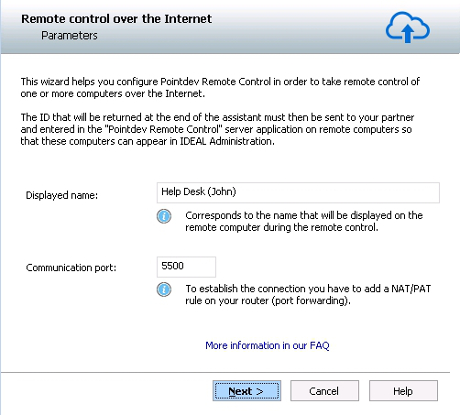
- Displayed name: the name under which you want to appear when you take control of a remote computer. Corresponds by default to the NetBIOS name of the machine but can be freely changed (eg user name, ...)
- Communication port: to establish the connection you have to add a NAT/PAT rule on your router (port forwarding). Indicate here the forwarded port you have configured on your router. See "How to configure my router (site of administration)?". You have to open this port in the firewall of your admin computer or allow the "vncviewer" software located under "\Program Files\Pointdev\IDEAL Administration (or IDEAL Remote)\VNC\VNC_Viewer_2X."
- Pointdev Remote Control account
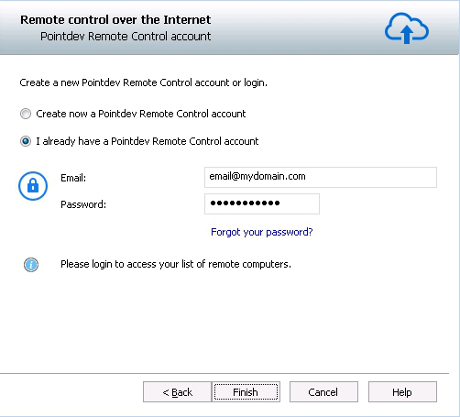
- You can create a new Pointdev Remote Control account if you do not have already one (or if you want to create an account per remote site to administer). Please enter a valid email address and a password. The email address you entered will allow you to activate your Pointdev Remote Control account and will be required to recover your list of remote computers, for example during a new installation of the software. You can also share your Pointdev Remote Control account with a colleague to access the same computers.
- Or you can login if you already have a Pointdev Remote Control account. Please then enter the email address and the associated password.
- Account validation
To validate the creation of your Pointdev Remote Control account, please enter the ID that you received by email at the address provided.
- Give the ID to the remote partner
To attach a remote computer to your Pointdev Remote Control account and to see it in your list of computers, you just have to provide to your partner your ID and the email address associated with the account. This latter must download the server part of Pointdev Remote Control. See "How to configure the server part of" Pointdev Remote Control "(remote computer)?".


