


 Français
 Español
 Deutsch
 Italiano
 Русский
How to configure the "Pointdev Remote Control" server part (remote computer)?
How to install and configure the "Pointdev Remote Control" server part on the remote computer?
Here are the steps to follow to install and configure the server part of Pointdev Remote Control:
- Download the software and install it.
- Configure the installation mode
- User mode (default): Pointdev Remote Control must be run manually to allow remote control. Designed for casual use, but requires to be physically present in front of the computer.
- Service Mode: Pointdev Remote Control will run continuously and will automatically start with Windows. Ideal for accessing this computer at any time, without being physically in front of it.
- Allow remote control
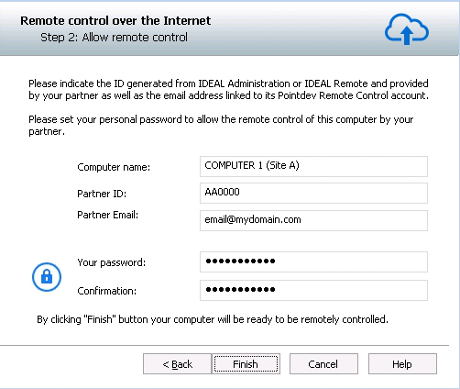
You must fill in this window several information:
- Computer name: the name that you want to appear in the administration interface of your partner. By default it corresponds to the NetBIOS name of the machine but it can be freely changed.
- Partner ID: the identifier for the Pointdev Remote Control account that you received from your partner.
- Partner Email : corresponds to the email of the Pointdev Remote Control account of your partner. This information is needed to verify the identity of your partner.
- Your password: Set a personal password to authorize the control of your computer by your partner. He will have to enter this code to confirm the remote control.
Once these steps are validated, the Pointdev Remote Control icon will appear in the taskbar.

Doing a right click, you can:
- Stop the listening mode to pause until further notice any incoming connection on the computer.
- Go to options to change your configuration. In the "Advanced" tab you can:
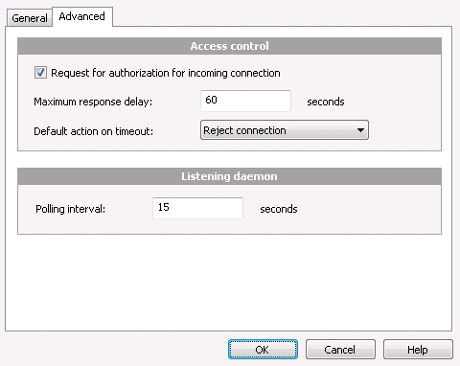
- Increase the security of your computer by checking "Request for authorization for incoming connection". This will warn you when your partner wants to take control of your computer.
- Configure the response delay and the default action on timeout.
- Change the polling interval of the listening daemon. This parameter (by default 15 seconds) defines the detection cycle of a new incoming connection by the Pointdev Remote Control tool.


