Français
 English
 Español
 Deutsch
 Italiano
VBScript Action - How to deploy the creation of a shortcut on the desktop of computers of your network?
VBScript Action - How to deploy the creation of a shortcut on the desktop of computers of your network?
Pre-requisite:
Scripts:
- Creation of a shortcut relative to IDEAL Administration Software
set WshShell = WScript.CreateObject("WScript.Shell")
strDesktop = WshShell.SpecialFolders("AllUsersDesktop" )
set oShellLink = WshShell.CreateShortcut(strDesktop & "\MY IA.lnk" )
oShellLink.WindowStyle = 1
oShellLink.TargetPath = "C:\Program Files\Pointdev\IDEAL Administration\IA.exe"
oShellLink.WorkingDirectory = "C:\Program Files\Pointdev\IDEAL Administration"
oShellLink.Save
- Creation of a shortcut of a ".txt" file that will open with notepad
set WshShell = WScript.CreateObject("WScript.Shell" )
strDesktop = WshShell.SpecialFolders("Desktop" )
set oShellLink = WshShell.CreateShortcut(strDesktop & "\Shortcut Script.lnk" )
oShellLink.TargetPath = "notepad.exe"
oShellLink.WindowStyle = 1
oShellLink.Hotkey = "Ctrl+Alt+f"
oShellLink.IconLocation = "notepad.exe, 0"
oShellLink.Description = "Shortcut Script"
oShellLink.WorkingDirectory = strDesktop
oShellLink.Arguments = "C:\myFile.txt"
oShellLink.Save
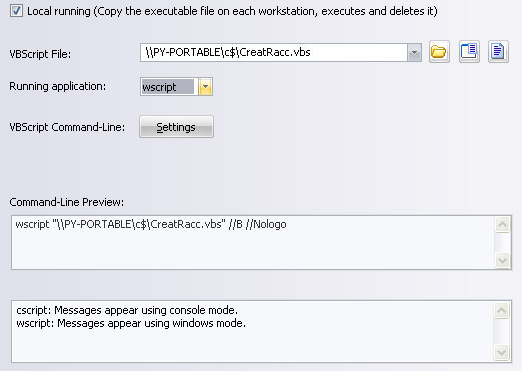
You must configure the following arguments:
- Select the action: VBScript
- Check the box Local running.
- Enter the path of the executable file: c:\CreatRacc.vbs
- Select wscript as executable VBScript.
- With the help of VBScript Arguments Management, select //B //Nologo for a silent execution