


 Français
 English
 Español
 Deutsch
 Русский

Espace Reva
2 allée Josime MARTIN
13160 CHATEAURENARD
FRANCE
Tel. : 33 9 77 63 61 94
Fax : 33 4 32 62 71 35 Tel.: 33 9 77 63 61 94

FAQ : IDEAL ADMINISTRATION
Controlla il tuo Active Directory in tempo reale, senza agenti
How to configure Remote Control Software over the Internet (Pointdev Remote Control)?How to configure the "Pointdev Remote Control" client part (admin computer)? |
How to configure the "Pointdev Remote Control" client part on the admin computer and have access to the list of remote computers? |
|
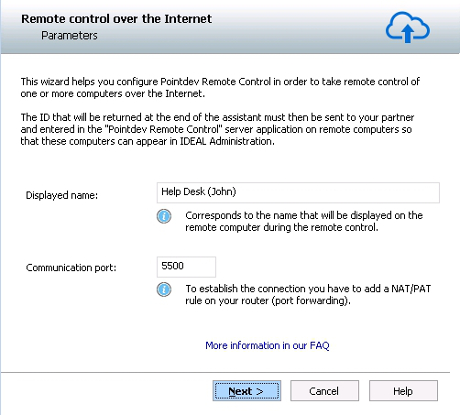
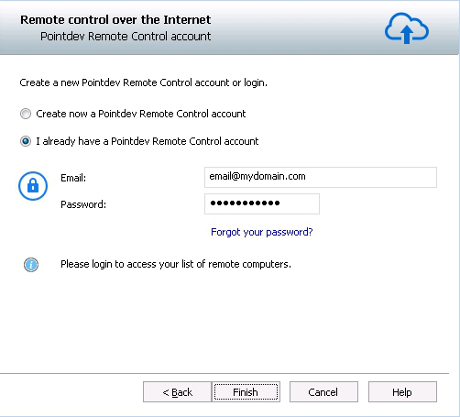
Here are the steps to configure the client part of Pointdev Remote Control:
To validate the creation of your Pointdev Remote Control account, please enter the ID that you received by email at the address provided.
To attach a remote computer to your Pointdev Remote Control account and to see it in your list of computers, you just have to provide to your partner your ID and the email address associated with the account. This latter must download the server part of Pointdev Remote Control. See "How to configure the server part of" Pointdev Remote Control "(remote computer)?". |
| Riguarda anche il seguente software: IDEAL REMOTE |
| Ultima modifica: 27/05/2015 |
Vuoi verificarlo di persona? Prova IDEAL ADMINISTRATION gratuitamente per 30 giorni.
Senza impegno • Senza agente • Supporto incluso • Pronto in 5 minuti


IDEAL ADMINISTRATION 26.8.5
SCARICA PROVA GRATIS 30 GIORNI
SOFTWARE
SERVIZI
MAPPA DEL SITO
POINTDEV
ESPACE REVA2 ALLEE JOSIME MARTIN
13160 CHATEAURENARD
FRANCE


