Français
 English
 Español
 Deutsch
 Italiano
 Русский
MSI Action: How to remotely install Open Office with MSI?
Example n°9: Remotely installing Open Office with a MSI
Remote running means that the program to be installed must be present on another PC in the network. On a file server, for example.
Description:
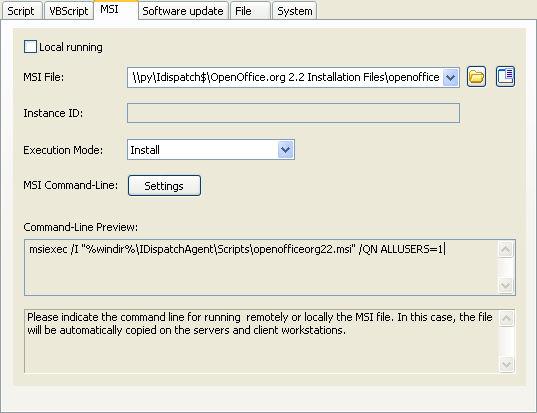
Run the file OOo_2.2.1_Win32Intel_install_wJRE_fr.exe without installing it, then launch the file openofficeorg22.msi from the created directory in remote installation.
You must configure the following arguments:
- Do not check the Local running checkbox.
- Indicate the path of the executable file: \\py\Idispatch$\OpenOffice.org 2.2 InstallationFiles\openofficeorg22.msi
- Indicate the type of action: Install
- Arguments (Settings button):
- /QN for silent installation
- ALLUSERS=1 to manage all profiles