FAQ : IDEAL DISPATCH

Implemente, ejecute y gestione sus acciones IT de forma remota desde una única interfaz

Buscar Ayuda  

Preguntas frecuentes

By using this search engine, you can search one or more terms in the complete Pointdev FAQ.

  • In order to look for one or more keywords, type them in the search field using space to separate them.

    ex : remote control

    This search will show you every FAQ containing the word "remote" OR "control".

  • In order to look for a full sentence, use the quotes " " around your keywords
  • ex : "remote control"

    This search will show you every FAQ containing the whole word "remote control".


 Título y contenido
 Solo titulo

¡IDEAL ADMINISTRATION 2026 ya está disponible!

Con IDEAL ADMINISTRATION 2026, la administración de Active Directory da un nuevo paso adelante. Esta versión se centra en la detección proactiva, el análisis inteligente de alertas mediante IA en la nube y la ayuda a la toma de decisiones, manteniendo al mismo tiempo la simplicidad, la eficacia y la administración sin agentes. ⬇️ Versión gratuita de 30 días.


Some examples of deployments by using IDEAL Dispatch

VBScript Action - How to deploy the creation of a shortcut on the desktop of computers of your network?

VBScript Action - How to deploy the creation of a shortcut on the desktop of computers of your network?

Pre-requisite:

Scripts:

  • Creation of a shortcut relative to IDEAL Administration Software

set WshShell = WScript.CreateObject("WScript.Shell")
strDesktop = WshShell.SpecialFolders("AllUsersDesktop" )
set oShellLink = WshShell.CreateShortcut(strDesktop & "\MY IA.lnk" )
oShellLink.WindowStyle = 1
oShellLink.TargetPath = "C:\Program Files\Pointdev\IDEAL Administration\IA.exe"
oShellLink.WorkingDirectory = "C:\Program Files\Pointdev\IDEAL Administration"
oShellLink.Save

  • Creation of a shortcut of a ".txt" file that will open with notepad

set WshShell = WScript.CreateObject("WScript.Shell" )
strDesktop = WshShell.SpecialFolders("Desktop" )
set oShellLink = WshShell.CreateShortcut(strDesktop & "\Shortcut Script.lnk" )
oShellLink.TargetPath = "notepad.exe"
oShellLink.WindowStyle = 1
oShellLink.Hotkey = "Ctrl+Alt+f"
oShellLink.IconLocation = "notepad.exe, 0"
oShellLink.Description = "Shortcut Script"
oShellLink.WorkingDirectory = strDesktop
oShellLink.Arguments = "C:\myFile.txt"
oShellLink.Save

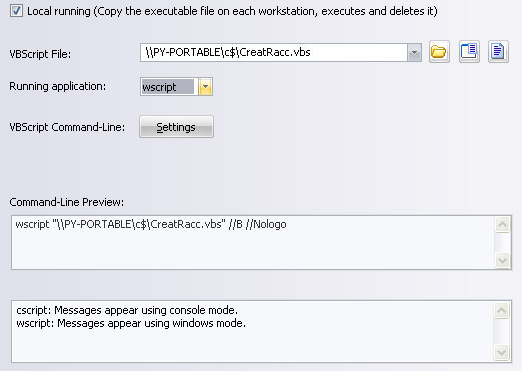
You must configure the following arguments:

  • Enter the path of the executable file: c:\CreatRacc.vbs
  • Select wscript as executable VBScript.
  • With the help of VBScript Arguments Management, select //B //Nologo for a silent execution


Última modificación: 23/05/2013

Anterior
   
Siguiente

Vuelve a la lista


P+F : IDEAL ADMINISTRATION | IDEAL DISPATCH | IDEAL REMOTE | IDEAL MIGRATION


IDEAL DISPATCH 9.9
DESCARGAR
VERSIÓN GRATUITA
Volver al principio de la página