


 Français
 English
 Deutsch
 Italiano
 Русский

Espace Reva
2 allée Josime MARTIN
13160 CHATEAURENARD
FRANCE
Tel. : 33 9 77 63 61 94
Fax : 33 4 32 62 71 35 Tel.: 33 9 77 63 61 94

FAQ : IDEAL ADMINISTRATION
Controle su Active Directory en tiempo real, sin agentes
Windows Active Directory Domain ManagementHow to wake up remote computers with the "Wake On Lan" (WOL) function? |
I've read that your administration tools, IDEAL Administration and IDEAL Remote, have Wake On Lan functions for remote wakeup of client computers. |
|
Wake on Lan is a hardware / software solution that allows a computer to be remotely woken. A computer that has a network connection and is ACPI (Advanced Configuration Power Interface) compatible can be remotely enabled. As a reminder, the Wake On LAN function enables remote stations to be woken up by sending a "Magic" packet over the network. For this packet to be correctly formed, you need to indicate the MAC address of the network card on the remote computer, along with its broadcast address. In a first, Wake on Lan must be enabled in the BIOS of the computer, and then configured in the operating system.
To configure Wake On Lan in Windows 8, Windows 7, Windows 10: Press Windows key + X to bring up the hidden quick access menu:
To configure Wake On Lan in Windows XP:
IMPORTANT: The computer must be in either Sleep or Hibernation mode for this to work. Once these prerequisites have been verified, we can use the Wake On Lan function from our software. First, download the free 30 day version of our software if you have not installed it yet: Download IDEAL Administration. Once installed, just execute it under a domain admin account.
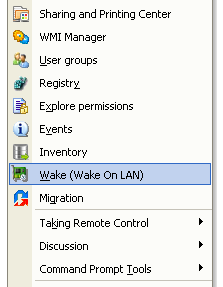
Select Computers menu and Wake (Wake On Lan)
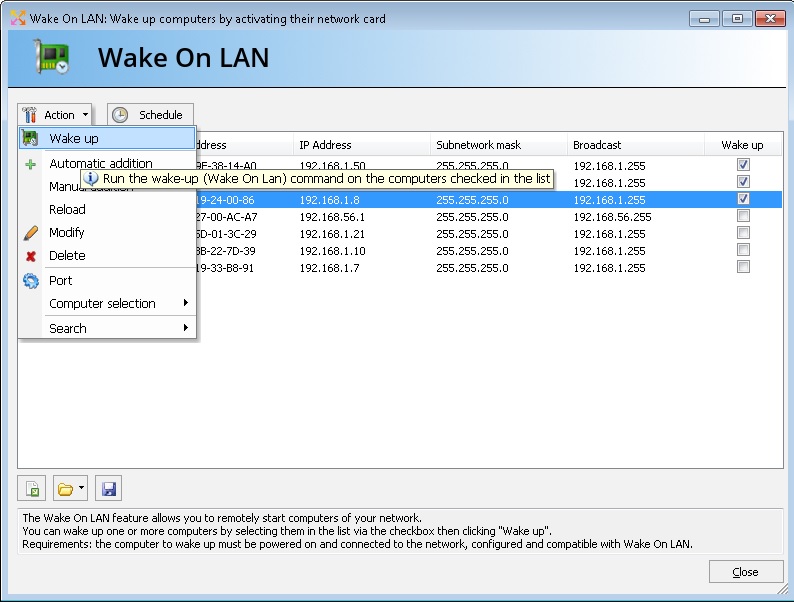
IDEAL Administration & IDEAL Remote provide simple management of Wake On LAN.
IDEAL Administration & IDEAL Remote let you run the Wake On LAN function from the command line. |
| También afecta al software siguiente: IDEAL REMOTE |
| Última modificación: 24/11/2021 |
¿Quiere comprobarlo usted mismo? Pruebe IDEAL ADMINISTRATION gratis durante 30 días.
Sin compromiso • Sin agente • Soporte incluido • Listo en 5 minutos


IDEAL ADMINISTRATION 26.8.5
DESCARGAR PRUEBA GRATIS 30 DÍAS
SOFTWARE
SERVICIOS
MAPA DEL SITIO
POINTDEV
ESPACE REVA2 ALLEE JOSIME MARTIN
13160 CHATEAURENARD
FRANCE


