


 Français
 English
 Deutsch
 Italiano
 Русский

Espace Reva
2 allée Josime MARTIN
13160 CHATEAURENARD
FRANCE
Tel. : 33 9 77 63 61 94
Fax : 33 4 32 62 71 35 Tel.: 33 9 77 63 61 94

FAQ : IDEAL DISPATCH
Implemente, ejecute y gestione sus acciones IT de forma remota desde una única interfaz
What are the different filters available during deployments?How to filter the selection of target computers of my deployment? |
How to filter the selection of target computers of my deployment? How to improve the selection of target computers? |
|
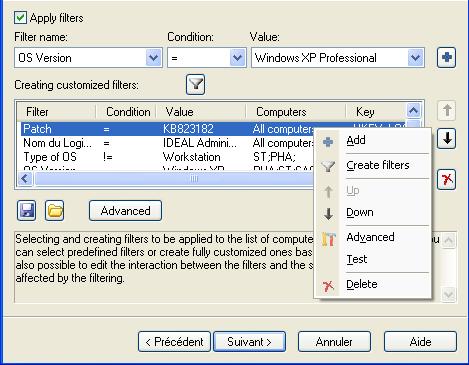
A filter can be applied to a variety of computers, on a set of conditions based, for example, on the version or OS type, or on values / registry keys in order to refine the selection.
The Test Filters button allows to test which computers of the selection will still be active after applying the filter.
|
| Última modificación: 15/05/2013 |
 ),
), 
¿Quiere comprobarlo usted mismo? Pruebe IDEAL DISPATCH gratis durante 30 días.
Sin compromiso • Sin agente • Soporte incluido • Listo en 5 minutos


IDEAL DISPATCH 9.9
DESCARGAR PRUEBA GRATIS 30 DÍAS
SOFTWARE
SERVICIOS
MAPA DEL SITIO
POINTDEV
ESPACE REVA2 ALLEE JOSIME MARTIN
13160 CHATEAURENARD
FRANCE


