


 Français
 English
 Deutsch
 Italiano
 Русский

POINTDEV
Espace Reva
2 allée Josime MARTIN
13160 CHATEAURENARD
FRANCE
Tel. : 33 9 77 63 61 94
Fax : 33 4 32 62 71 35 Tel.: 33 9 77 63 61 94
Espace Reva
2 allée Josime MARTIN
13160 CHATEAURENARD
FRANCE
Tel. : 33 9 77 63 61 94
Fax : 33 4 32 62 71 35 Tel.: 33 9 77 63 61 94

FAQ : IDEAL DISPATCH
Implemente, ejecute y gestione sus acciones IT de forma remota desde una única interfaz
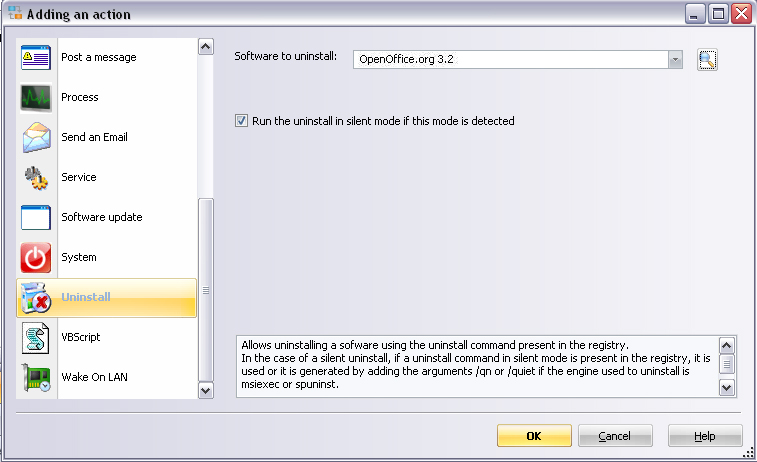
Some examples of deployments by using IDEAL DispatchUninstall Action - How to deploy the uninstall of Open Office on your network? |
How to deploy the silent uninstall of Open Office on your network? |
|
Pre-requisite:
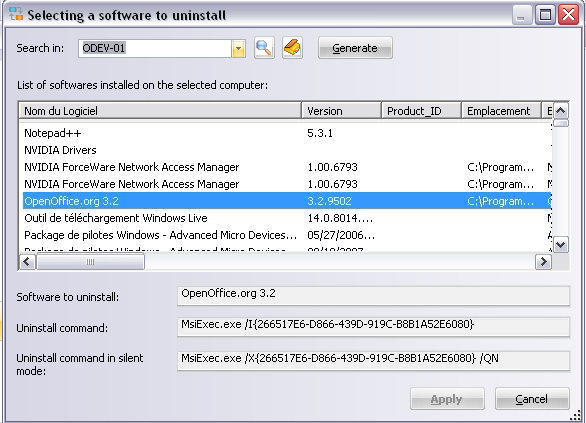
Select the software to uninstall, for this, enter the name of the computer in the Search in field and then click on the Generate button to get the list of all softwares installed on this computer. Select the software to uninstall from the list:
Finally, click on Apply to validate your choice. |
| Última modificación: 24/05/2013 |
¿Quiere comprobarlo usted mismo? Pruebe IDEAL DISPATCH gratis durante 30 días.
DESCARGAR VERSIÓN DE PRUEBA 30 DÍAS
Sin compromiso • Sin agente • Soporte incluido • Listo en 5 minutos

Anterior

Siguiente
Vuelve a la lista

IDEAL DISPATCH 9.9
DESCARGAR PRUEBA GRATIS 30 DÍAS
SOFTWARE
SERVICIOS
MAPA DEL SITIO
POINTDEV
ESPACE REVA2 ALLEE JOSIME MARTIN
13160 CHATEAURENARD
FRANCE


