


 Français
 Español
 Deutsch
 Italiano
 Русский

Espace Reva
2 allée Josime MARTIN
13160 CHATEAURENARD
FRANCE
Tel : 33 9 77 63 61 94
Fax : 33 4 32 62 71 35 Tel: 33 9 77 63 61 94

FAQ : IDEAL DISPATCH
Deploy, execute and manage your IT actions remotely from a single interface
What are the different possible actions during deployments?How to deploy uninstall software remotely? |
How to deploy software uninstalling on your network with IDEAL Dispatch? |
|
This action (
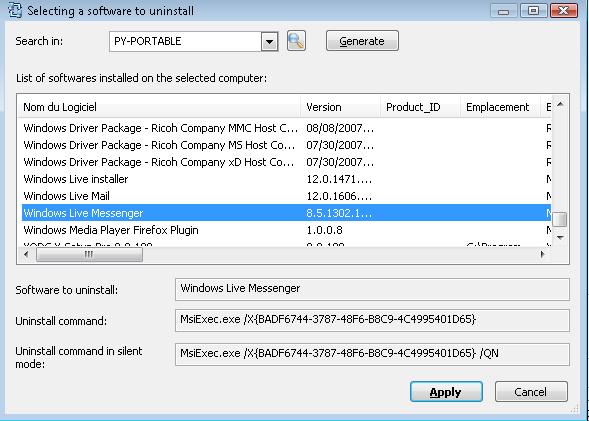
You can list the installed software on remote computers and show their uninstall command as their silent uninstall command if detected..
The silent uninstall command allows to uninstall a software without any user intervention. Otherwise, uninstall will be displaying a dialog box. Example : Uninstalling the Windows Live Messenger application
|
| Last modification: 06/19/2017 |
 ) allows to uninstall a software from servers or workstations by executing it's uninstall command located on the registry of each client workstation.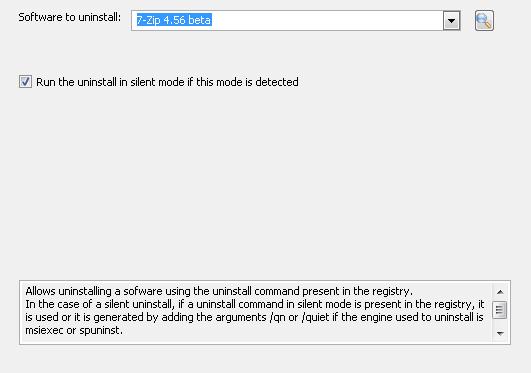
Want to check for yourself? Try IDEAL DISPATCH free for 30 days.
No commitment • No agent • Support included • Ready to use in 5 minutes


IDEAL DISPATCH 9.9
DOWNLOAD FREE 30-DAY TRIAL
SOFTWARE
SERVICES
SITEMAP
POINTDEV
ESPACE REVA2 ALLEE JOSIME MARTIN
13160 CHATEAURENARD
FRANCE


