


 Français
 Español
 Deutsch
 Italiano
 Русский

Espace Reva
2 allée Josime MARTIN
13160 CHATEAURENARD
FRANCE
Tel : 33 9 77 63 61 94
Fax : 33 4 32 62 71 35 Tel: 33 9 77 63 61 94

FAQ : IDEAL REMOTE
Take remote control of all your systems, simply and securely
Windows Active Directory ConfigurationHow to add an Active Directory property in the list of computers? |
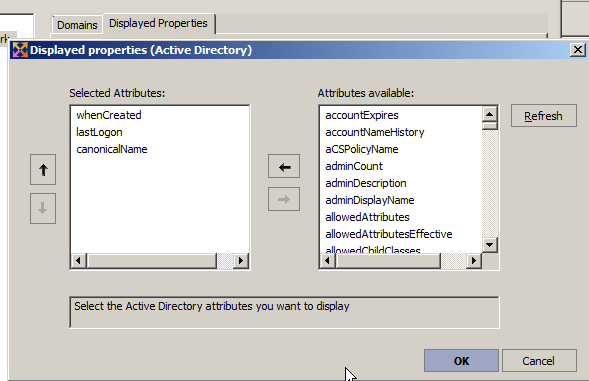
I would like to display a new Active Directory property to personalize my list of computers in my Active Directory domain (Microsoft Windows Network tab). This property is "whenCreated" which allows to know the creation date of the computer in my Active Directory domain. Is that possible ? If yes, how ? |
|
You can easily add Active Directory (AD) properties to the list of computers belonging to your Active Directory domain. To do this, use the general menu Tools, Options, Microsoft Windows Network, Displayed Properties tab. Select the Active Directory button, then Add. You can select a property from those offered by our software. After validating your configuration, you must update the list by pressing the F5 key or by clicking on the icon for it to be taken into account Some examples of custom Active Directory properties: - whenCreated: Creation date of the computer in the domain
|
| Also concerns the following software: IDEAL ADMINISTRATION |
| Last modification: 03/16/2022 |
 .
.
Want to check for yourself? Try IDEAL REMOTE free for 30 days.
No commitment • No agent • Support included • Ready to use in 5 minutes


IDEAL REMOTE 26.8.5
DOWNLOAD FREE 30-DAY TRIAL
SOFTWARE
SERVICES
SITEMAP
POINTDEV
ESPACE REVA2 ALLEE JOSIME MARTIN
13160 CHATEAURENARD
FRANCE


