


 Français
 English
 Español
 Italiano
 Русский

Espace Reva
2 allée Josime MARTIN
13160 CHATEAURENARD
FRANCE
Tel : 33 9 77 63 61 94
Faxnummer : 33 4 32 62 71 35 Tel: 33 9 77 63 61 94

FAQ : IDEAL DISPATCH
Stellen Sie Ihre IT-Aktionen remote bereit, führen Sie sie aus und steuern Sie sie über eine einzige Oberfläche
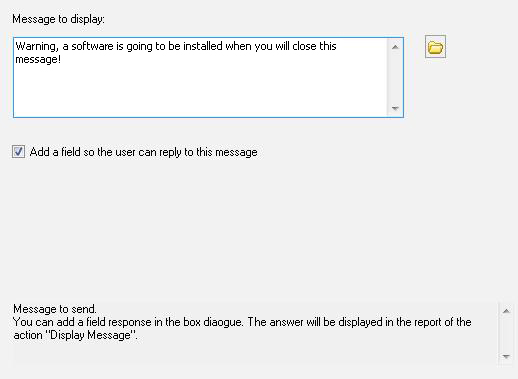
Some examples of deployments by using IDEAL DispatchDisplay a message Action - How to warn users before installing a software on your network? |
Display a message Action - How to warn users before installing a software on your network? |
|
Pre-requisite:
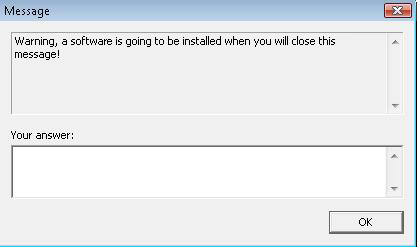
Here is an example of a dialog box that the remote user will be able to see on his computer after the execution of the display a message action:
|
| Letzte Änderung: 24/05/2013 |
Möchten Sie es selbst überprüfen? Testen Sie IDEAL DISPATCH 30 Tage lang kostenlos.
Unverbindlich • Ohne Agent • Support inklusive • In 5 Minuten einsatzbereit


IDEAL DISPATCH 9.9
30-TAGE-TESTVERSION HERUNTERLADE
SOFTWARE
DIENSTLEISTUNGEN
SITEMAP
POINTDEV
ESPACE REVA2 ALLEE JOSIME MARTIN
13160 CHATEAURENARD
FRANCE


