
 русский
 Французский
 Английский
 Испанский
 Немецкий
 Итальянский

Espace Reva
2 allée Josime MARTIN
13160 CHATEAURENARD
FRANCE
Tel : 33 9 77 63 61 94
Факс : 33 4 32 62 71 35 Tel: 33 9 77 63 61 94

FAQ : IDEAL REMOTE
Получите удалённый контроль над всеми системами — просто и безопасноС IDEAL ADMINISTRATION 2026 администрирование Active Directory становится ещё более полным. Проактивное обнаружение, интеллектуальный анализ оповещений с помощью облачного ИИ, поддержка принятия решений и теперь безопасное удалённое управление с RustDesk, всё без агентов, для централизованного, эффективного и полностью контролируемого администрирования. ⬇️ 30-дневная бесплатная версия.
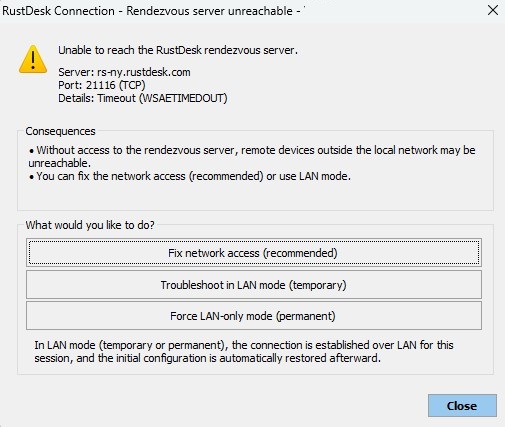
How to use the RustDesk remote control tool in IDEAL REMOTE?RustDesk rendezvous server is unreachable |
When I try to take control of a remote computer using RustDesk, a dialog box appears indicating that the RustDesk rendezvous server is unreachable. Why does this dialog box appear, and how can I fix the issue? |
❓ Why does this window appear?This window appears when the administration workstation is unable to establish an outgoing connection to the RustDesk rendezvous server. Example displayed: Server: rs-ny.rustdesk.com
This generally means that the Internet connection on this port is:
Without access to the rendezvous server, connections via ID (access outside the local network) may fail.
What is the rendezvous server?The RustDesk rendezvous server allows:
If it is unreachable, only direct local network (LAN) connections will work.
How to fix the issue?1. Check network connectivity From the administration workstation, run: Test-NetConnection rs-ny.rustdesk.com -Port 21116 If the test fails:
2. Check DNS Run: nslookup rs-ny.rustdesk.com If the IP address does not resolve:
3. Check corporate security policies In some environments:
In this case, you will need to:
|
| Также касается следующего программного обеспечения: IDEAL ADMINISTRATION |
| Последняя модификация: 21/02/2026 |


IDEAL REMOTE 26.5.1
БЕСПЛАТНАЯ
ЗАГРУЗКА
ИНСТРУМЕНТЫ
СЕРВИСЫ
КAPTA CAЙTA
POINTDEV
ESPACE REVA2 ALLEE JOSIME MARTIN
13160 CHATEAURENARD
FRANCE


