


 Français
 English
 Español
 Deutsch
 Italiano

Espace Reva
2 allée Josime MARTIN
13160 CHATEAURENARD
FRANCE
Tel : 33 9 77 63 61 94
Факс : 33 4 32 62 71 35 Tel: 33 9 77 63 61 94

FAQ : IDEAL DISPATCH
Развёртывайте, выполняйте и управляйте ИТ-действиями удалённо из единого интерфейса
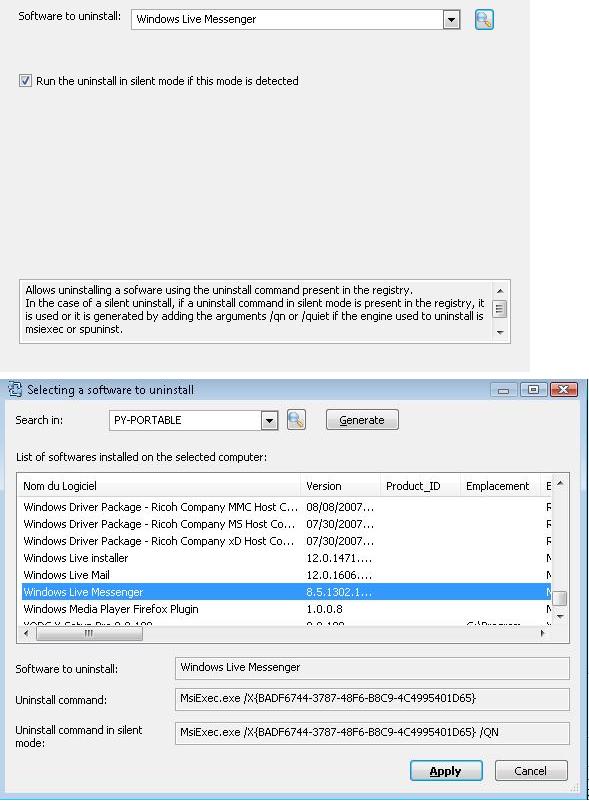
Some examples of deployments by using IDEAL DispatchUninstall Action: How to uninstall Windows Live Messenger in silent mode? |
Example n°15: Uninstalling the Windows Live Messenger application |
|
Create a new distribution by setting up the start-up account for the agent, the computers involved in the distribution and finally add a new action. In the Add an action dialog box, choose the Uninstall action and then click on the magnifying glass button to select the software (cf. Software to uninstall). Select the software to be uninstalled. To do this, give the name of a computer in the Search in field and then click on Generate button to obtain the list of software installed on it. Select the software to be uninstalled from the list offered (cf. Selecting a software to uninstall):
Finally, click on Apply to confirm your choice.
|
| Последняя модификация: 04/10/2017 |
Хотите проверить сами? Попробуйте IDEAL DISPATCH бесплатно в течение 30 дней.
Без обязательств • Без агента • Поддержка включена • Готово к использованию за 5 минут


IDEAL DISPATCH 9.9
БЕСПЛАТНЫЙ ТЕСТ 30 ДНЕЙ
ИНСТРУМЕНТЫ
СЕРВИСЫ
КAPTA CAЙTA
POINTDEV
ESPACE REVA2 ALLEE JOSIME MARTIN
13160 CHATEAURENARD
FRANCE


