Français
 English
 Español
 Deutsch
 Italiano
VBScript Action: Deactivating the Firewall by running a VBScript locally
Example n°8: Deactivating the Firewall by running a VBScript locally
Running locally means that the file to be read or run will be copied automatically to all servers and workstations involved in the distribution.
Description:
This VBS script deactivates the firewall in XP SP2.
Script:
Set objFirewall = CreateObject("HNetCfg.FwMgr")
Set objPolicy = objFirewall.LocalPolicy.CurrentProfile
objPolicy.FirewallEnabled = FALSE
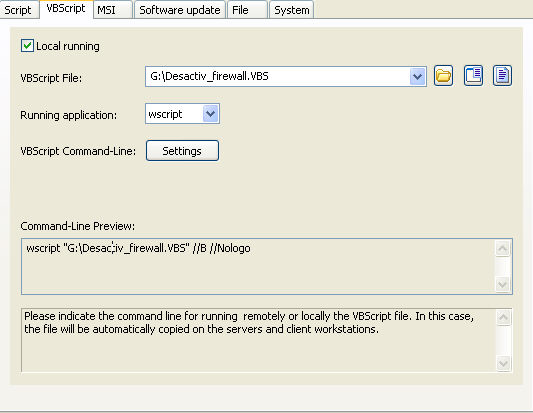
You must configure the following arguments:
- Check the Local running checkbox.
- Indicate the path of the executable file: G:\Desactiv_firewall.VBS
- Select wscript as an executable VBScript.
- Using the VBScript argument manager, select //B //Nologo for silent running