


 Français
 English
 Español
 Deutsch
 Italiano

POINTDEV
Espace Reva
2 allée Josime MARTIN
13160 CHATEAURENARD
FRANCE
Tel : 33 9 77 63 61 94
Факс : 33 4 32 62 71 35 Tel: 33 9 77 63 61 94
Espace Reva
2 allée Josime MARTIN
13160 CHATEAURENARD
FRANCE
Tel : 33 9 77 63 61 94
Факс : 33 4 32 62 71 35 Tel: 33 9 77 63 61 94

FAQ : IDEAL DISPATCH
Развёртывайте, выполняйте и управляйте ИТ-действиями удалённо из единого интерфейса
Some examples of deployments by using IDEAL DispatchExecutable Action: How to play an audio file remotely? |
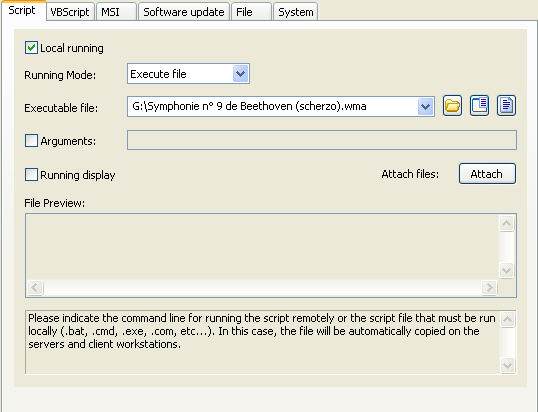
Example n°11: Locally playing an audio file |
|
Running locally means that the file to be read or run will be copied automatically to all servers and workstations involved in the distribution. You must configure the following arguments:
|
| Последняя модификация: 04/10/2017 |
Хотите проверить сами? Попробуйте IDEAL DISPATCH бесплатно в течение 30 дней.
СКАЧАТЬ БЕСПЛАТНУЮ ВЕРСИЮ НА 30 ДНЕЙ
Без обязательств • Без агента • Поддержка включена • Готово к использованию за 5 минут

Previous

Next
Назад к списку

IDEAL DISPATCH 9.9
БЕСПЛАТНЫЙ ТЕСТ 30 ДНЕЙ
ИНСТРУМЕНТЫ
СЕРВИСЫ
КAPTA CAЙTA
POINTDEV
ESPACE REVA2 ALLEE JOSIME MARTIN
13160 CHATEAURENARD
FRANCE


