Français
 English
 Español
 Deutsch
 Italiano
MSI Action: How to remotely install Office Professional 2003 with MSI?
Example n°10: Remotely installing Office Professional 2003 with a MSI
Remote running means that the program to be installed must be present on another PC in the network. On a file server, for example.
Description:
Installation from the cd with product code management.
Share the cd reader on the network.
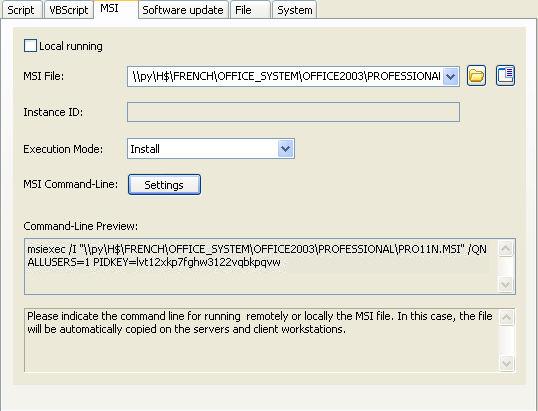
You must configure the following arguments:
- Do not check the Local running checkbox.
- Indicate the path of the executable file: \\py\H$\FRENCH\OFFICE_SYSTEM\OFFICE2003\PROFESSIONAL\PRO11N.MSI
- Indicate the type of action: Install
- Arguments (Settings button):
- /QN for silent installation
- ALLUSERS=1 to manage all profiles
- PIDKEY=************************* : your product key