


 Français
 English
 Español
 Deutsch
 Italiano

Espace Reva
2 allée Josime MARTIN
13160 CHATEAURENARD
FRANCE
Tel : 33 9 77 63 61 94
Факс : 33 4 32 62 71 35 Tel: 33 9 77 63 61 94

FAQ : IDEAL ADMINISTRATION
Контролируйте Active Directory в реальном времени без агентов
Windows Active Directory Domain ManagementHow do I create alerts for Active Directory audits? |
Does IDEAL ADMINISTRATION allow triggering alerts from real-time Active Directory audits, and how do I configure them? |
|
Yes. IDEAL ADMINISTRATION 26 (and later) can trigger alerts based on real-time Active Directory audits. The alert system is directly based on the Active Directory Real-Time Audits already available in the software. Each audit can be configured to generate an alert when a specific condition is detected. Once configured, the alert is automatically triggered as soon as the corresponding audit occurs. The administrator is immediately notified via a bell-shaped icon, whose color reflects the severity level. You can then:
This mechanism turns real-time audits into actionable alerts, enabling proactive monitoring and decision-making, without installing any additional agent. What types of events can trigger an alert? Alerts can be triggered from many Active Directory audits, including:
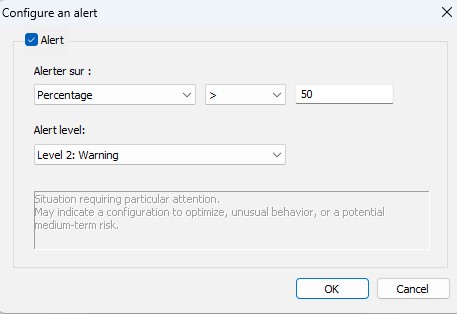
Each audit can be configured to generate an alert or not. How do I configure an alert? Alerts are configured from the Real-Time Audits configuration interface. To configure an alert:
This approach ensures full consistency between audit and alert. ➡️ What types of alert conditions are available? IDEAL ADMINISTRATION 26 allows you to configure alerts based on several conditions:
This makes it possible to precisely adapt alerts to the reality of each environment. ➡️ How do I define the severity of an alert? Each alert can be associated with a severity level, for example:
This level determines:
➡️ How am I notified when an alert is triggered? When an alert is detected:
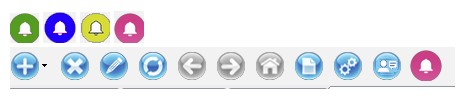 A simple click on this icon gives access to the Active Directory alerts list. ➡️ What can I do from the alerts list? From the alerts list, the administrator can:
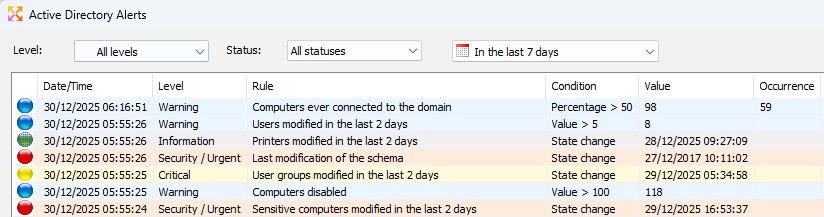 ➡️ Is it possible to view the events behind an alert? Yes. The View button opens a window listing:
This guarantees complete traceability and factual evidence for the alert. ➡️ What is the role of AI in alerts? IDEAL ADMINISTRATION 26 can associate a smart Cloud AI analysis with an alert. The AI can:
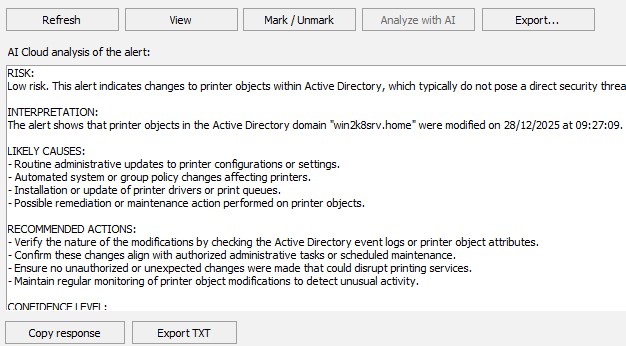 The analysis is presented as a clear and structured report. ➡️ Can an alert be analyzed multiple times by the AI? No. When an AI analysis exists:
This choice ensures:
➡️ Are AI analyses kept? Yes. They can be:
➡️ Does the AI have direct access to my Active Directory? No. It only analyzes the information provided by the alert and acts as an aid to understanding, never as an execution engine. ➡️ Is an Internet connection required? Yes. The AI service subscription is included in IDEAL ADMINISTRATION 26. ➡️ Does this feature require installing an agent? No. ✅ In summary Active Directory alerts in IDEAL ADMINISTRATION 26 provide:
|
| Последняя модификация: 20/01/2026 |
Хотите проверить сами? Попробуйте IDEAL ADMINISTRATION бесплатно в течение 30 дней.
Без обязательств • Без агента • Поддержка включена • Готово к использованию за 5 минут


IDEAL ADMINISTRATION 26.8.5
БЕСПЛАТНЫЙ ТЕСТ 30 ДНЕЙ
ИНСТРУМЕНТЫ
СЕРВИСЫ
КAPTA CAЙTA
POINTDEV
ESPACE REVA2 ALLEE JOSIME MARTIN
13160 CHATEAURENARD
FRANCE


