FAQ : IDEAL DISPATCH

Развёртывайте, выполняйте и управляйте ИТ-действиями удалённо из единого интерфейса

поиск помощь  

ЧАВО

By using this search engine, you can search one or more terms in the complete Pointdev FAQ.

  • In order to look for one or more keywords, type them in the search field using space to separate them.

    ex : remote control

    This search will show you every FAQ containing the word "remote" OR "control".

  • In order to look for a full sentence, use the quotes " " around your keywords
  • ex : "remote control"

    This search will show you every FAQ containing the whole word "remote control".


 Название и содержание
 титр

Some examples of deployments by using IDEAL Dispatch

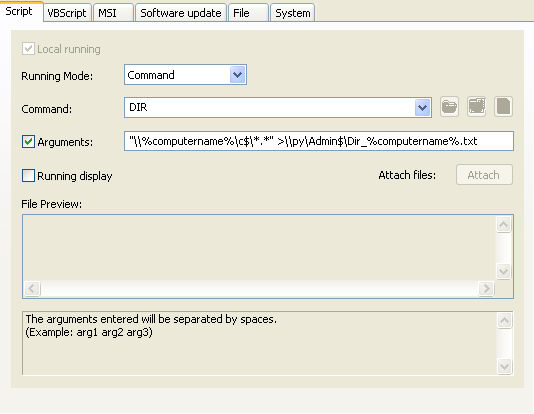
Command Action: Running the DIR command

Example n°2: Running the DIR command

You must configure the following arguments:

  • Select the type of action:   Command.
  • Enter the command: DIR
  • Check the Arguments checkbox and enter: "\\%computername%\c$\*.*" >\\py\Admin$\Dir_%computername%.txt
Последняя модификация: 16/04/2010

Хотите проверить сами? Попробуйте IDEAL DISPATCH бесплатно в течение 30 дней.

СКАЧАТЬ БЕСПЛАТНУЮ ВЕРСИЮ НА 30 ДНЕЙ

Без обязательств • Без агента • Поддержка включена • Готово к использованию за 5 минут


Previous
   
Next

Назад к списку


ЧАВО : IDEAL ADMINISTRATION | IDEAL DISPATCH | IDEAL REMOTE | IDEAL MIGRATION


IDEAL DISPATCH 9.9
БЕСПЛАТНЫЙ ТЕСТ 30 ДНЕЙ
начало страницы