Français
 English
 Español
 Deutsch
 Italiano
How to apply predefined filters to specific computers?
How to apply predefined filters to specific computers?
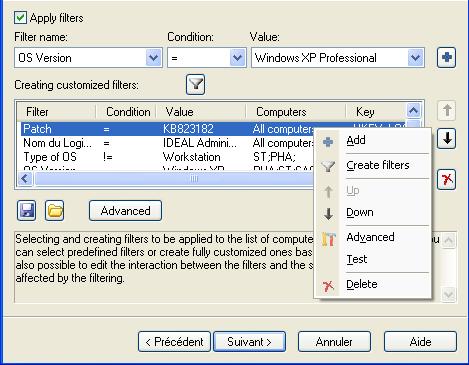
These are filters where values and conditions cannot be changed.
Conditions and values are pre-populated based on the selected filter.
List of available filters:
- OS Version: All computers, All servers, All workstations, Windows Seven, Windows 2008, Windows VISTA, Windows 2003 Server, Windows 2000 Server, Windows NT 4 Server, Windows NT Server 3.x, Windows 2000 Professional, Windows XP Professional, Windows NT 4 Workstation.
- OS Type: Workstation or server.
- IE (Internet Explorer) version: 7.0, 6.0, 5.5, 5.0, 4.0.
- Service Pack: No Service Pack, SP1, SP2, SP3, SP4, SP5, SP6, SP7.
- Processor: x86, x64, ia64.
- Language: All languages in which Windows is available.
- Computer: Name of a computer belonging to the original selection.
List of available conditions:
- Equal: "="
- Different: "!="
- Strictly greater than: ">"
- Strictly less than: "<"
- Greather than or equal: ">="
- Less than or equal: "<="