


 Français
 English
 Español
 Deutsch
 Русский

Espace Reva
2 allée Josime MARTIN
13160 CHATEAURENARD
FRANCE
Tel. : 33 9 77 63 61 94
Fax : 33 4 32 62 71 35 Tel.: 33 9 77 63 61 94

FAQ : IDEAL DISPATCH
Distribuisci, esegui e gestisci le tue azioni IT da remoto da un’unica interfaccia
What are the different possible actions during deployments?How to deploy the copy, delete, or edit of a file or folder on a network? |
How to deploy the copy, delete, or edit of a file or folder on a network? |
|
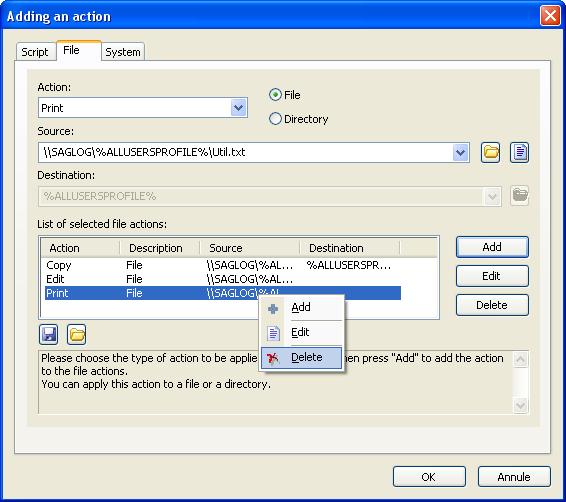
From this action, you can copy ( It is also possible to edit /read (
The local copy means that the file or folder is copied in a transition folder during the installation phase, and then moved to its destination directory during the execution phase.
The remote copy means that the file or folder is copied in its destination folder during the execution phase.
Environment variables used for the assigning a destination path:
Examples :
|
| Ultima modifica: 27/05/2013 |
 ), move (
 ) or delete (
 ) a file or a folder on all selected computers.
 ) any kind of file (.txt, .doc,.wav, .avi, .ppt, .html, .xsl …).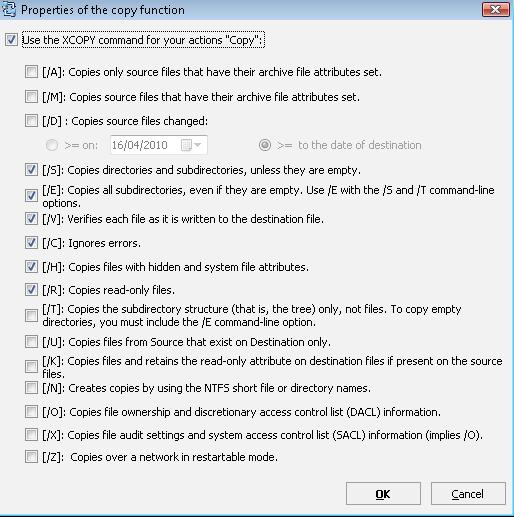
Vuoi verificarlo di persona? Prova IDEAL DISPATCH gratuitamente per 30 giorni.
Senza impegno • Senza agente • Supporto incluso • Pronto in 5 minuti


IDEAL DISPATCH 9.9
SCARICA PROVA GRATIS 30 GIORNI
SOFTWARE
SERVIZI
MAPPA DEL SITO
POINTDEV
ESPACE REVA2 ALLEE JOSIME MARTIN
13160 CHATEAURENARD
FRANCE


