


 Français
 English
 Español
 Deutsch
 Русский

Espace Reva
2 allée Josime MARTIN
13160 CHATEAURENARD
FRANCE
Tel. : 33 9 77 63 61 94
Fax : 33 4 32 62 71 35 Tel.: 33 9 77 63 61 94

FAQ : IDEAL ADMINISTRATION
Controlla il tuo Active Directory in tempo reale, senza agenti
How to use the RustDesk remote control tool in IDEAL ADMINISTRATION?RustDesk Error: RustDesk rendezvous server is unreachable |
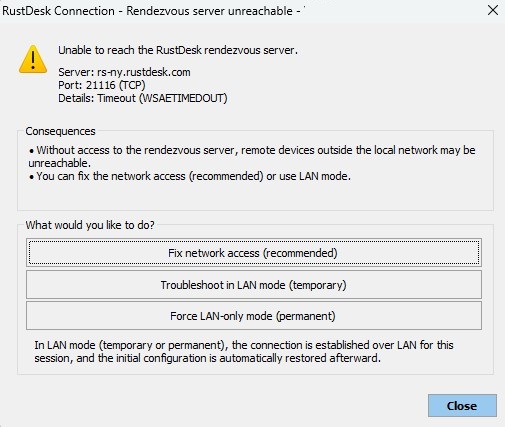
When I try to take control of a remote computer using RustDesk, a dialog box appears indicating that the RustDesk rendezvous server is unreachable. Why does this dialog box appear, and how can I fix the issue? |
❓ Why does this window appear?This window appears when the administration workstation is unable to establish an outgoing connection to the RustDesk rendezvous server. Example displayed: Server: rs-ny.rustdesk.com
This generally means that the Internet connection on this port is:
Without access to the rendezvous server, connections via ID (access outside the local network) may fail. What is the rendezvous server?The RustDesk rendezvous server allows:
If it is unreachable, only direct local network (LAN) connections will work. How to fix the issue?1. Check network connectivity From the administration workstation, run: Test-NetConnection rs-ny.rustdesk.com -Port 21116 If the test fails:
2. Check DNS Run: nslookup rs-ny.rustdesk.com If the IP address does not resolve:
3. Check corporate security policies In some environments:
In this case, you will need to:
How to use LAN mode?If Internet access cannot be allowed, you can use LAN mode. Mode "Troubleshoot in LAN (temporary)" The connection is established only over the local network No communication with the rendezvous server Works only if devices are:
At the end of the session, the initial configuration is automatically restored. Mode "Force LAN-only" All connections will be made exclusively over the local network No access via ID or Internet server Recommended in:
⚠ Devices located outside the local network will not be accessible. When should LAN mode be used?Use LAN mode if:
When should LAN mode NOT be used?Do not use LAN mode if:
Best practices
Secured environment?If your organization prohibits all Internet communication:
|
| Riguarda anche il seguente software: IDEAL REMOTE |
| Ultima modifica: 01/03/2026 |
Vuoi verificarlo di persona? Prova IDEAL ADMINISTRATION gratuitamente per 30 giorni.
Senza impegno • Senza agente • Supporto incluso • Pronto in 5 minuti


IDEAL ADMINISTRATION 26.8.5
SCARICA PROVA GRATIS 30 GIORNI
SOFTWARE
SERVIZI
MAPPA DEL SITO
POINTDEV
ESPACE REVA2 ALLEE JOSIME MARTIN
13160 CHATEAURENARD
FRANCE


