Français
 English
 Español
 Deutsch
 Italiano
 Русский

How to add an Active Directory property in the list of computers?
I would like to display a new Active Directory property to personalize my list of computers in my Active Directory domain (Microsoft Windows Network tab).
This property is "whenCreated" which allows to know the creation date of the computer in my Active Directory domain.
Is that possible ? If yes, how ?
You can easily add Active Directory (AD) properties to the list of computers belonging to your Active Directory domain.
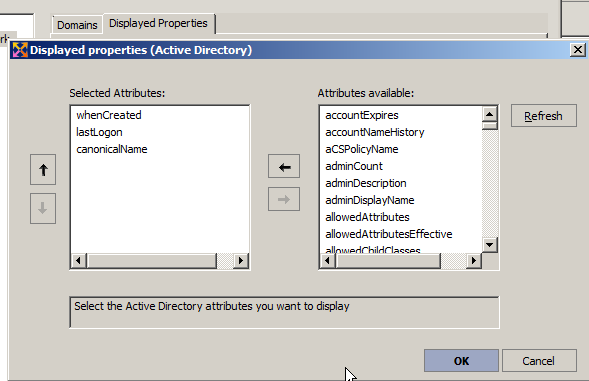
To do this, use the general menu Tools, Options, Microsoft Windows Network, Displayed Properties tab.
Select the Active Directory button, then Add.
You can select a property from those offered by our software.
After validating your configuration, you must update the list by pressing the F5 key or by clicking on the icon for it to be taken into account  .
Some examples of custom Active Directory properties:
- whenCreated: Creation date of the computer in the domain
- lastLogon: Last logon to the domain
- canonicalName: Full name of the computer in the domain