FAQ : IDEAL ADMINISTRATION

Amministra i tuoi ambienti Windows Active Directory e i tuoi Workgroup da un’unica console

Cerca Guida  

FAQ

By using this search engine, you can search one or more terms in the complete Pointdev FAQ.

  • In order to look for one or more keywords, type them in the search field using space to separate them.

    ex : remote control

    This search will show you every FAQ containing the word "remote" OR "control".

  • In order to look for a full sentence, use the quotes " " around your keywords
  • ex : "remote control"

    This search will show you every FAQ containing the whole word "remote control".


 Titolo e contenuto
 Solo titolo

IDEAL ADMINISTRATION 2026 è disponibile!

Con IDEAL ADMINISTRATION 2026, l’amministrazione di Active Directory compie un nuovo passo avanti. Questa versione pone l’accento sul rilevamento proattivo, sull’analisi intelligente degli avvisi grazie all’IA cloud e sul supporto alle decisioni, mantenendo al contempo semplicità, efficienza e un’amministrazione senza agenti. ⬇️ Versione gratuita di 30 giorni.


How to perform Real-Time Audit of Active Directory Domains?

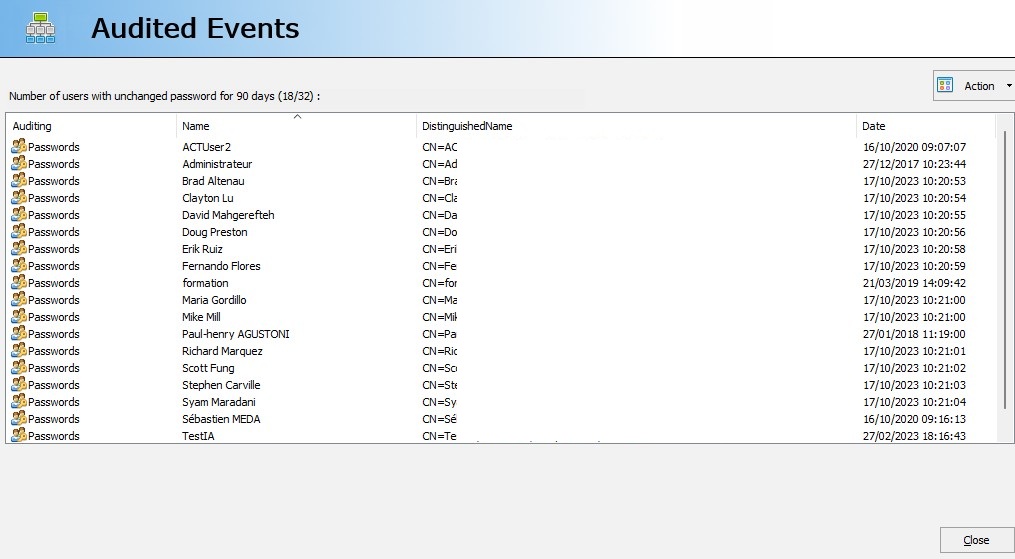
How to view audited events?

I want to view audited events. Your software indicates that a computer was recently modified, but I would like to know which one. How do I do this?

To view the audited events, double-click on the event in question, or "Action", "View".

For example, "Number of computers modified in the last 2 days". A dialog box shows you all the events corresponding to the audit in question.
Ultima modifica: 13/01/2026

Precedente
   
Successivo

Torna alla lista


FAQ : IDEAL ADMINISTRATION | IDEAL DISPATCH | IDEAL REMOTE | IDEAL MIGRATION


Torna in alto