


 Français
 English
 Español
 Deutsch
 Русский
How to configure the RustDesk permanent password in IDEAL ADMINISTRATION?
Is it possible to automatically configure a RustDesk permanent password from IDEAL ADMINISTRATION? If so, how can it be done?
What is the RustDesk permanent password?
The permanent password allows you to establish a remote connection to a computer without any intervention from the remote user.
Unlike the temporary password automatically generated by RustDesk, the permanent password:
- remains the same over time
- enables automated remote control
- facilitates administrative interventions
- is suited for professional environments
How to enable the permanent password?
In the RustDesk Settings window:
- Check "Enable permanent password"
- Enter a password that complies with the security rules
- Click OK
The status "Valid password" confirms that the password meets the required criteria.
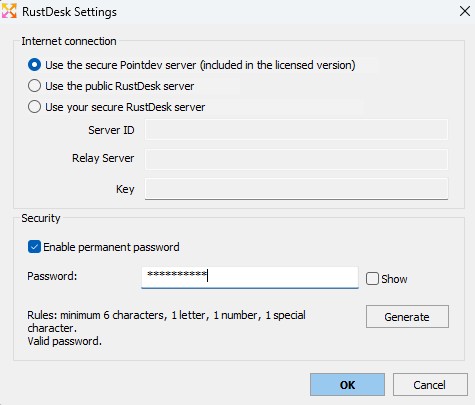
What are the password security rules?
The password must contain:
- Minimum 6 characters
- At least 1 letter (A–Z)
- At least 1 digit (0–9)
- At least 1 special character (e.g.:
! @ # $ %)
If a rule is not met, the password will be rejected.
What is the purpose of the "Generate" button?
The Generate button automatically creates a secure password that complies with all rules.
This helps to:
- avoid input errors
- ensure a sufficient level of security
- standardize deployments
How is the password applied to the remote computer?
When you start a remote control session via IDEAL ADMINISTRATION:
If the following option is checked:
Automatically configure a RustDesk permanent password
IDEAL ADMINISTRATION:
- Installs RustDesk if necessary
- Configures the defined permanent password
- Applies the security settings
- Can restrict usage to administrators only
All of this without an agent and remotely.
Is the password changed at each connection?
No, except if:
- you manually change the password
- you force a new configuration
- RustDesk is reinstalled
- you choose a complete uninstallation
Otherwise, the password remains unchanged.