


 Français
 English
 Español
 Deutsch
 Русский

Espace Reva
2 allée Josime MARTIN
13160 CHATEAURENARD
FRANCE
Tel. : 33 9 77 63 61 94
Fax : 33 4 32 62 71 35 Tel.: 33 9 77 63 61 94

FAQ : IDEAL REMOTE
Prendi il controllo remoto di tutti i tuoi sistemi, in modo semplice e sicuro
Windows Active Directory ConfigurationHow to add an Active Directory property in the list of computers? |
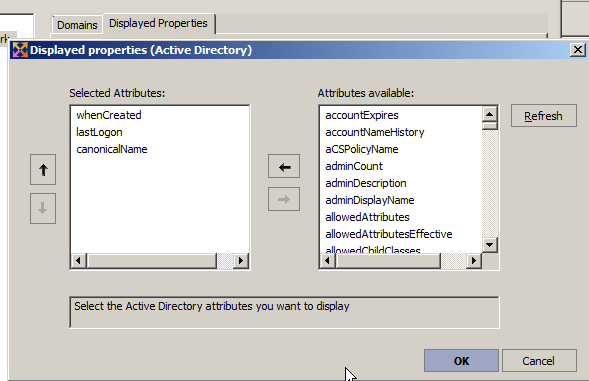
I would like to display a new Active Directory property to personalize my list of computers in my Active Directory domain (Microsoft Windows Network tab). This property is "whenCreated" which allows to know the creation date of the computer in my Active Directory domain. Is that possible ? If yes, how ? |
|
You can easily add Active Directory (AD) properties to the list of computers belonging to your Active Directory domain. To do this, use the general menu Tools, Options, Microsoft Windows Network, Displayed Properties tab. Select the Active Directory button, then Add. You can select a property from those offered by our software. After validating your configuration, you must update the list by pressing the F5 key or by clicking on the icon for it to be taken into account Some examples of custom Active Directory properties: - whenCreated: Creation date of the computer in the domain
|
| Riguarda anche il seguente software: IDEAL ADMINISTRATION |
| Ultima modifica: 16/03/2022 |
 .
.
Vuoi verificarlo di persona? Prova IDEAL REMOTE gratuitamente per 30 giorni.
Senza impegno • Senza agente • Supporto incluso • Pronto in 5 minuti


IDEAL REMOTE 26.8
SCARICA PROVA GRATIS 30 GIORNI
SOFTWARE
SERVIZI
MAPPA DEL SITO
POINTDEV
ESPACE REVA2 ALLEE JOSIME MARTIN
13160 CHATEAURENARD
FRANCE


