
 Italiano
 Francese
 Inglese
 Spagnolo
 Tedesco
 Russo
Russo

Espace Reva
2 allée Josime MARTIN
13160 CHATEAURENARD
FRANCE
Tel. : 33 9 77 63 61 94
Fax : 33 4 32 62 71 35 Tel.: 33 9 77 63 61 94

FAQ : IDEAL ADMINISTRATION
Amministra i tuoi ambienti Windows Active Directory e i tuoi Workgroup da un’unica consoleCon IDEAL ADMINISTRATION 2026, l’amministrazione di Active Directory diventa ancora più completa. Rilevamento proattivo, analisi intelligente degli avvisi tramite IA Cloud, supporto alle decisioni e ora controllo remoto sicuro con RustDesk, il tutto senza agent, per un’amministrazione centralizzata, efficiente e sotto controllo. ⬇️ Versione gratuita di 30 giorni.
How to use the RustDesk remote control tool in IDEAL ADMINISTRATION?How to use the RustDesk remote control tool in IDEAL ADMINISTRATION? |
Is RustDesk integrated into IDEAL ADMINISTRATION? If so, how does it work? |
|
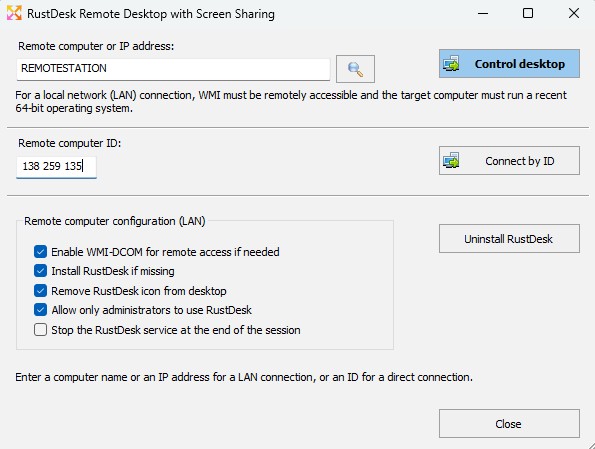
Yes, Version 26.5 (and later) of IDEAL ADMINISTRATION integrates the modern RustDesk remote control solution. To use RustDesk from IDEAL ADMINISTRATION, select the main menu Remote Desktop \ RustDesk Remote Desktop, or right-click on a computer in your organization and choose Remote Desktop \ RustDesk Remote Desktop.
➡️ What is RustDesk in IDEAL ADMINISTRATION?RustDesk is a modern remote control solution, natively integrated into IDEAL ADMINISTRATION starting from version 26.5. It complements the existing solutions:
RustDesk notably enables remote control:
➡️ Why add RustDesk when TightVNC already exists?TightVNC remains a simple and efficient solution, still available in IDEAL ADMINISTRATION. However, RustDesk brings several major improvements:
RustDesk does not replace TightVNC; ➡️ Do you need to manually install RustDesk on workstations?No. IDEAL ADMINISTRATION allows:
The installation can be performed:
➡️ Is an agent permanently installed?No. IDEAL ADMINISTRATION keeps its philosophy:
RustDesk is installed only when necessary, and can be:
➡️ Which systems are supported?RustDesk is intended for recent systems:
For older Windows systems, IDEAL ADMINISTRATION continues to offer:
How does a RustDesk connection work? Two modes are available. ➡️ LAN mode – Connection by computer nameIn this mode:
This mode also allows:
➡️ ID mode – Off-network connectionThis mode allows remote control:
You only need:
This mode is ideal for:
➡️ What is the RustDesk ID used for?The ID is the unique identifier of the RustDesk computer. It allows:
IDEAL ADMINISTRATION can:
➡️ Can the ID change?Generally, no. The ID remains the same as long as:
In the case of a full system reinstallation, the ID may be regenerated. ➡️ Are the ID and the computer name linked?Yes. IDEAL ADMINISTRATION establishes a bidirectional mapping:
This allows:
➡️ Do you need to know a RustDesk password?RustDesk manages authentication itself. The password can be:
IDEAL ADMINISTRATION does not store any RustDesk passwords. ➡️ Does the user need to approve the connection?This depends on the RustDesk configuration of the remote computer:
IDEAL ADMINISTRATION fully respects the local RustDesk configuration. ➡️ Does the RustDesk service start automatically?The RustDesk service can be:
However, for security reasons:
This is intentional behavior of the RustDesk product. ➡️ Why doesn’t the service start after reboot?RustDesk prioritizes security:
IDEAL ADMINISTRATION therefore starts the service:
➡️ What does the “Stop the service at the end of the session” option do?This option allows:
It is equivalent to what already existed with TightVNC. ➡️ Can the RustDesk icon be removed?Yes. IDEAL ADMINISTRATION can automatically:
This avoids any confusion for end users. ➡️ Are firewall rules modified?Yes, only if necessary. IDEAL ADMINISTRATION can automatically enable:
These are standard Microsoft-provided rules; no exotic rules are added. No inbound rule specific to RustDesk is created. ➡️ Can WMI be enabled even if it does not respond?Yes. IDEAL ADMINISTRATION can:
This provides a very reliable administration “bootstrap”. ➡️ Does RustDesk work without Internet?Yes, in LAN mode. In ID mode outside the network, RustDesk uses its identifier-based connection mechanism. No external IDEAL ADMINISTRATION server is required. ➡️ Can RustDesk be uninstalled remotely?Yes. IDEAL ADMINISTRATION allows:
The uninstallation can be performed:
➡️ Are actions visible during execution?Yes. The RustDesk dialog displays:
Tasks are executed in a separate thread to ensure the application is never blocked. ➡️ Is RustDesk mandatory?No. RustDesk is an optional feature. Administrators can continue to use:
depending on systems and requirements. ✅ SummaryThe integration of RustDesk into IDEAL ADMINISTRATION provides:
RustDesk integrates naturally into IDEAL ADMINISTRATION,without changing its philosophy:
|
| Ultima modifica: 02/02/2026 |


IDEAL ADMINISTRATION 26.0
SCARICAVERSIONE GRATUITA
SOFTWARE
SERVIZI
MAPPA DEL SITO
POINTDEV
ESPACE REVA2 ALLEE JOSIME MARTIN
13160 CHATEAURENARD
FRANCE


