


 Français
 English
 Español
 Deutsch
 Русский

Espace Reva
2 allée Josime MARTIN
13160 CHATEAURENARD
FRANCE
Tel. : 33 9 77 63 61 94
Fax : 33 4 32 62 71 35 Tel.: 33 9 77 63 61 94

FAQ : IDEAL REMOTE
Prendi il controllo remoto di tutti i tuoi sistemi, in modo semplice e sicuro
Windows Active Directory ConfigurationHow to configure your Active Directory domains? |
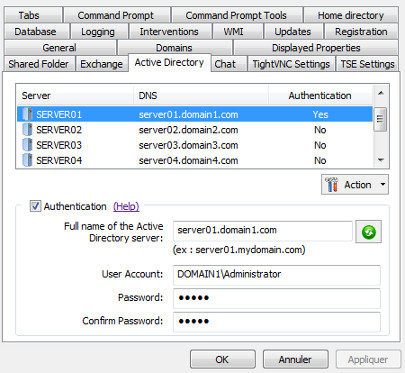
How to fill in the information in the "Active Directory" dialog box, from "Tools" menu, "Options"? |
|
This dialog allows you to fill in for each of your Active Directory servers on the network, the credentials needed to connect and query Active Directory.
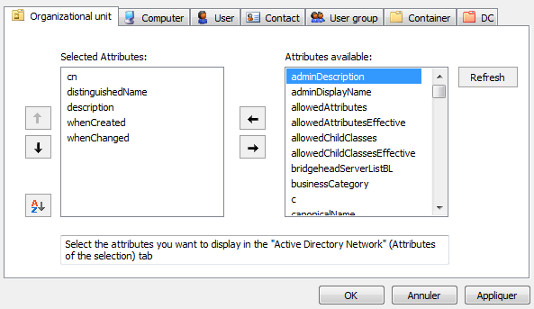
Select a server and then check the "Authentication" box. You can then fill in the full name (DNS) of the Active Directory server and the domain administrator account that will be used for AD queries. The button "Automatic Search" allows to automatically retrieve the full name of the AD server by using its NetBIOS name. With IDEAL Administration: by right clicking on a server in the list, you also have the option to configure for this server, the properties displayed for the following objects: Organization Unit, Computer, User, Contact, User Group, Container, DC (domain component). These attributes are used:
|
| Riguarda anche il seguente software: IDEAL ADMINISTRATION |
| Ultima modifica: 06/04/2017 |
Vuoi verificarlo di persona? Prova IDEAL REMOTE gratuitamente per 30 giorni.
Senza impegno • Senza agente • Supporto incluso • Pronto in 5 minuti


IDEAL REMOTE 26.8
SCARICA PROVA GRATIS 30 GIORNI
SOFTWARE
SERVIZI
MAPPA DEL SITO
POINTDEV
ESPACE REVA2 ALLEE JOSIME MARTIN
13160 CHATEAURENARD
FRANCE


