


 Français
 English
 Español
 Deutsch
 Русский

Espace Reva
2 allée Josime MARTIN
13160 CHATEAURENARD
FRANCE
Tel. : 33 9 77 63 61 94
Fax : 33 4 32 62 71 35 Tel.: 33 9 77 63 61 94

FAQ : IDEAL ADMINISTRATION
Controlla il tuo Active Directory in tempo reale, senza agenti
Windows Active Directory Domain ManagementHow to clean SID History attributes from Active Directory? |
I have to remove the SID History attributes of the user groups and user accounts in my Active Directory domain. How can I do this using IDEAL Administration? |
|
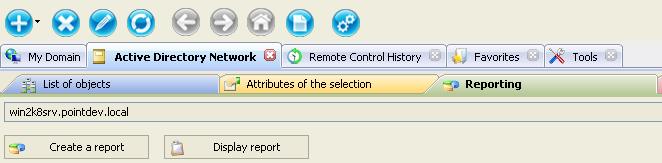
First, download the free 30 day version of our software if you have not installed it yet: Download IDEAL Administration. Once installed, just execute it under a domain admin account. On the right view select Active Directory Network tab, and then Reporting.
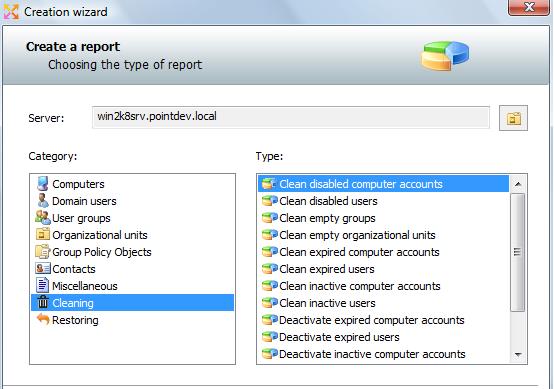
Select Create a report button, and Cleaning reports.
The "Reporting" tab allows through the creation of cleaning reports to reset SID History Attributes of your Active Directory users & groups. ➡️ List of cleaning reports:
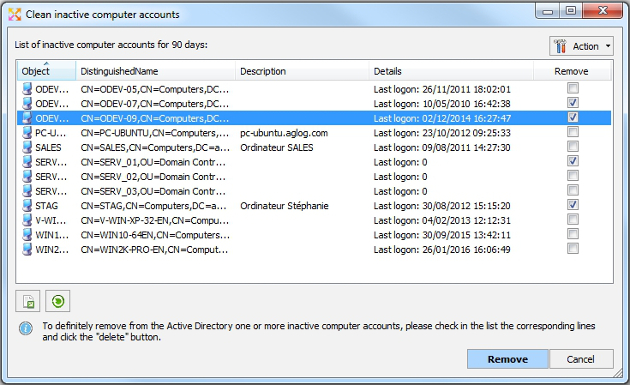
➡️ Example: To delete inactive computer accounts
Once the report is opened, you can print it by clicking the button provided for that purpose. You can also deploy categories to see the detail and the computer list or click the "Display all" to deploy all the categories.
|
| Ultima modifica: 13/01/2026 |
Vuoi verificarlo di persona? Prova IDEAL ADMINISTRATION gratuitamente per 30 giorni.
Senza impegno • Senza agente • Supporto incluso • Pronto in 5 minuti


IDEAL ADMINISTRATION 26.8
SCARICA PROVA GRATIS 30 GIORNI
SOFTWARE
SERVIZI
MAPPA DEL SITO
POINTDEV
ESPACE REVA2 ALLEE JOSIME MARTIN
13160 CHATEAURENARD
FRANCE


