


 English
 Español
 Deutsch
 Italiano
 Русский

Espace Reva
2 allée Josime MARTIN
13160 CHATEAURENARD
FRANCE
Tél : +33 (0) 9 77 63 61 94
Fax : +33 (0) 4 32 62 71 35 Tél: +33 (0)9 77 63 61 94

FAQ : IDEAL REMOTE
Prenez le contrôle à distance de tous vos systèmes, simplement et en toute sécurité
How to configure the TightVNC remote control tool (screen sharing)?How to troubleshoot "VNC Authentication Failed" message? |
From time to time, I've got "VNC Authentication Failed" when I try to remote control a machine of my network using TightVNC with IDEAL Administration. How can I solve this issue? Try IDEAL Administration during 30 days on your network for free! |
|
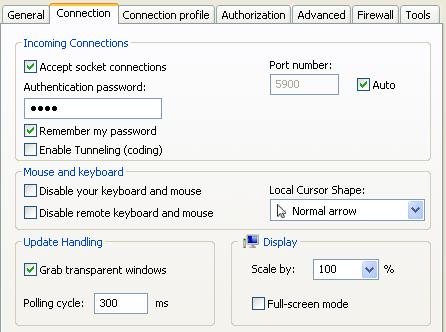
"Authentication failed" message means that you can contact the remote computer, but connection is rejected due to a wrong password. Please check the password you have entered in your TightVNC Settings, "Connection" tab, "Authentication password".
You should also check the following prerequistes depending on the operating system of the remote computer: "Manage Windows XP" - "Manage Windows Vista" - "Manage Windows 7 / 8 / 10" If the problem still exists, please send an e-mail to support@pointdev.com describing your networking environnement (product version, OS of your administrative box and of the remote bow, are the boxes on the same network or not, are they members of the same domain or not, etc...). |
| Concerne également les logiciels suivants : IDEAL ADMINISTRATION |
| Dernière modification : 18/10/2021 |
Vous voulez vérifier par vous-même ? Testez IDEAL REMOTE gratuitement pendant 30 jours.
Sans engagement • Sans agent • Support inclus • Prêt en 5 minutes


IDEAL REMOTE 26.8.5
TÉLÉCHARGER L'ESSAI GRATUIT 30 JOURS
LOGICIELS
SERVICES
PLAN DU SITE
POINTDEV
ESPACE REVA2 ALLEE JOSIME MARTIN
13160 CHATEAURENARD
FRANCE


