


 Français
 English
 Deutsch
 Italiano
 Русский
ADMINISTRATION
 Simplifique la gestión de sus redes de Windows Active Directory
A partir de 389 € (EUR)
Ver toda la lista de preciosCompatible con
- Windows Server 2025
- Windows Server 2022
- Windows Server 2019
- Windows Server 2016
- Windows Server 2012
- Windows Server 2008
- Windows 11
- Windows 10
- Windows 8
Disponible en


IDEAL ADMINISTRATION: NOVEDADES
IDEAL ADMINISTRATION
Version 26.8.5NOVEDADES
IDEAL ADMINISTRATION
Version 26.8.5NOVEDADES
Sin compromiso • Sin agente • Soporte incluido • Listo en 5 minutos
Esta página reúne las nuevas funcionalidades, mejoras y optimizaciones implementadas para satisfacer mejor las necesidades de los administradores de sistemas.
-
14/09/2026New features in version 26.8.5
- RustDesk updated to version 1.4.9
- Improvements and bug fixes
-
19/06/2026New features in version 26.8
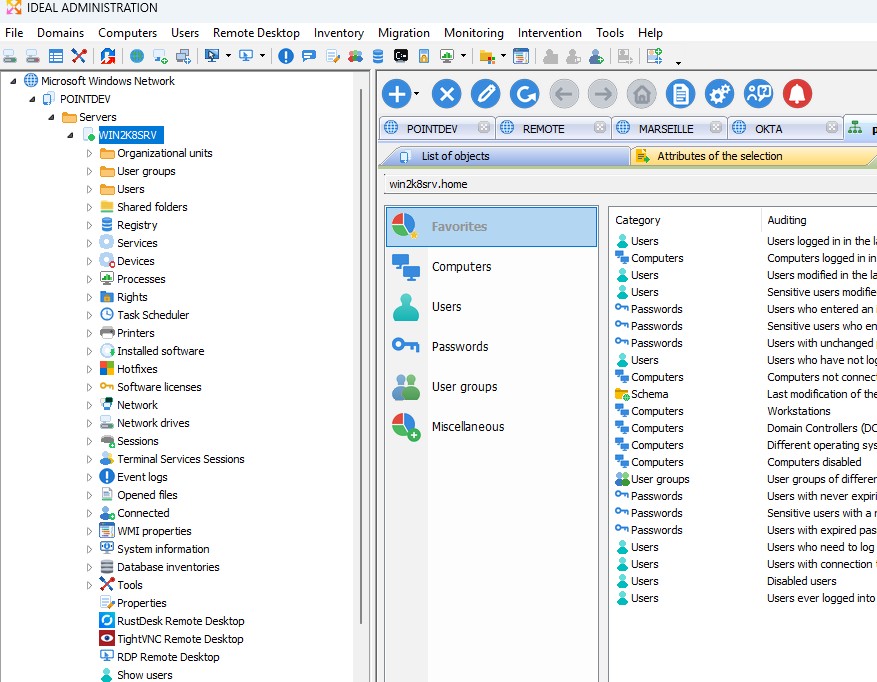
- New icons with a modern design
- All software icons have been redesigned in a flatter, more modern style, closer to the Windows 11 interface
- Visual modernization of the interface for improved readability and a more consistent user experience
- Clearer, cleaner icons, better suited to modern displays
- Fixed an issue that could cause the software to close unexpectedly when retrieving information from remote computers.
- Minor improvements and bug fixes
- New icons with a modern design
-
04/05/2026New features in version 26.7
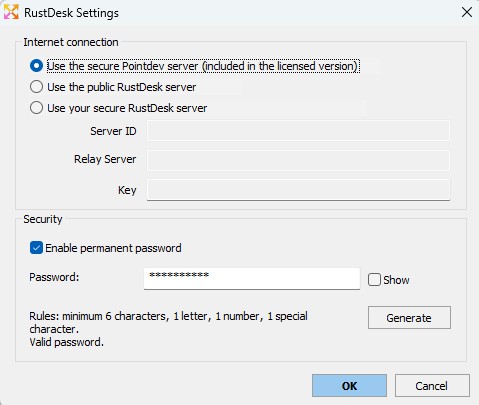
- Pointdev secure RustDesk server for better controlled remote access
- Addition of a dedicated configuration for the Pointdev secure RustDesk server, included with the licensed version
- Ability to choose between the Pointdev secure server, the public RustDesk server, or a custom RustDesk server
- Configuration of the ID server, relay server and RustDesk key directly from IDEAL ADMINISTRATION
- Better control over remote connections and the infrastructure used
- Reduced dependency on public RustDesk servers
- Adaptation to the network and security constraints of each organization
- Support for RustDesk connections over the local network or via the Internet
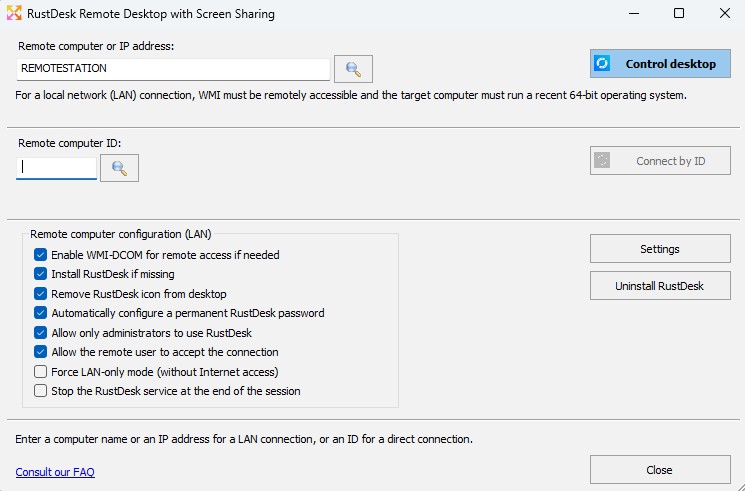
- Improved RustDesk integration
- RustDesk updated to version 1.4.6
- Improved authorization management during remote control sessions
- Configuration of connection approval by the remote user in LAN mode
- Improved saving and management of the permanent RustDesk password
- Improved Active Directory alerts and real-time audits
- Display of all unprocessed alerts directly in the notification tooltip
- Alerts sorted by type, date and priority level
- Improved readability of important active alerts
- Purge function for old alerts stored in the database
- Modernized HTML reports
- More modern and consistent presentation of generated reports
- Improved readability of exported information
- Performance, database and stability
- Optimized loading of several screens, including RDP history and favorites
- Improved overall software stability
- Minor improvements and bug fixes
- Pointdev secure RustDesk server for better controlled remote access
-
16/03/2026New features in version 26.5
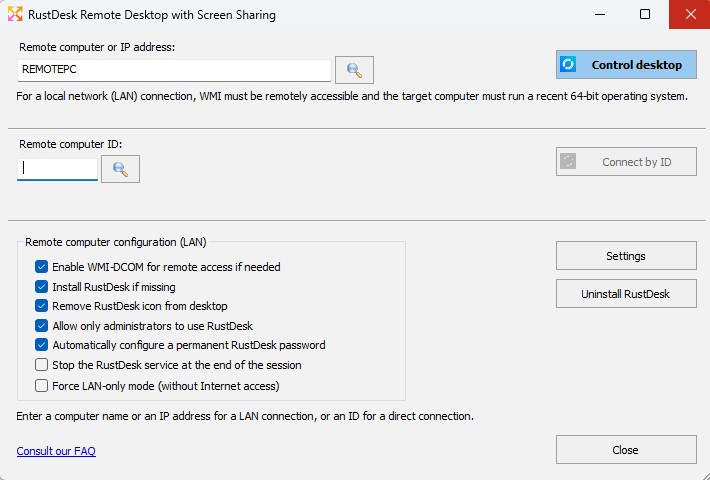
- RustDesk remote desktop for modern, secure, and automated remote control of client workstations (Consult our FAQ)
- Secure remote control on modern Windows systems
- Fully automated remote deployment and installation
- Automatic configuration of the permanent password
- Windows service operation, including before user logon
- Connections available on local networks (LAN) or outside the corporate network (remote work, mobility)
- End-to-end encryption
- Multi-monitor support
- Remote audio/video streaming
- Bidirectional file transfer with drag and drop file transfer between computers
- No inbound port opening required
- NAT and firewall traversal support
- Option to restrict RustDesk usage to administrators only (Prevents any unauthorized inter-user connections)
- Remote uninstallation with two available modes: partial removal or complete removal
- Multi-language support
- No IDEAL ADMINISTRATION agent required on client computers
- RustDesk remote desktop for modern, secure, and automated remote control of client workstations (Consult our FAQ)
-
12/01/2026New features in version 26
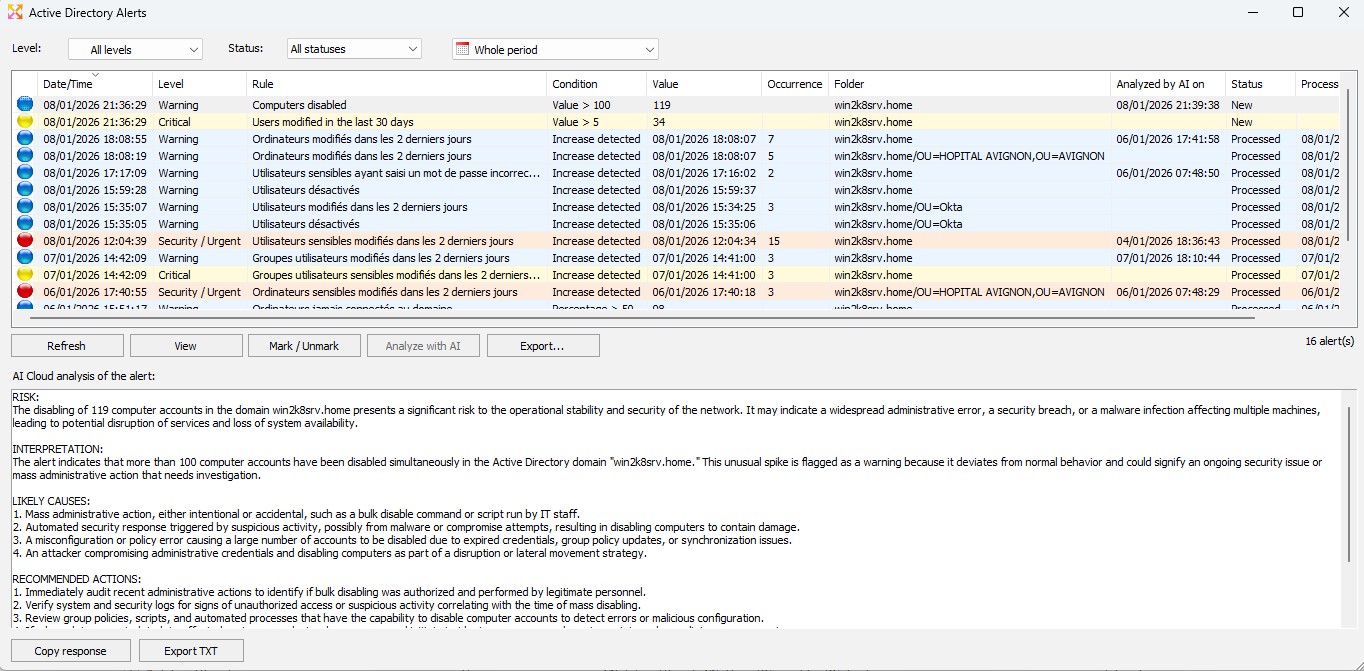
- Real-time Active Directory alerts with optional Cloud AI analysis (FAQ)
- Real-time Active Directory alerts based on native audits, agentless
- Precise alert configuration (upward variation, value or percentage threshold) with severity levels
- Immediate notification and centralized alerts in a dedicated, filterable interface
- Direct access to the events that triggered each alert for full traceability
- Intelligent alert analysis by Cloud AI with recommendations, stored locally
- No external AI Cloud subscription is required
- Menu Tools \ Active Directory Alerts or click on the icon

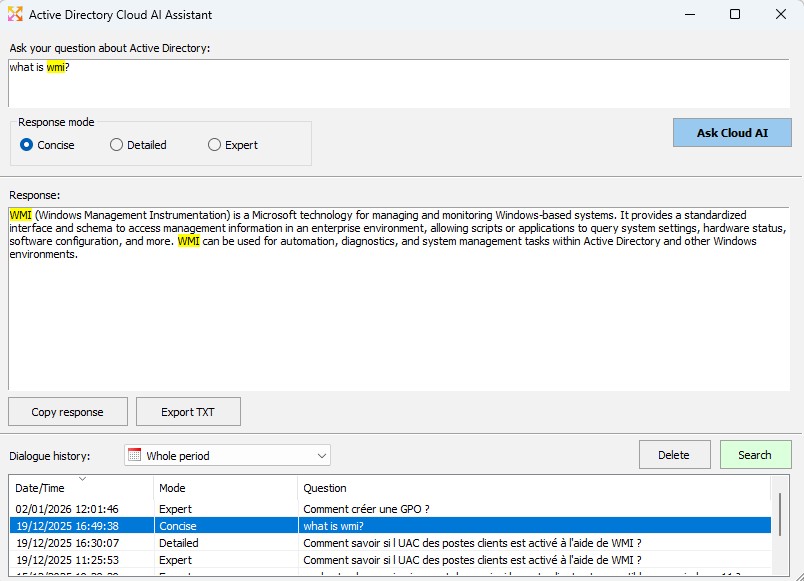
- Active Directory questions and answers powered by Cloud AI (FAQ)
- Answer history stored locally for later consultation
- Instant search within questions and answers
- Filtering questions and answers by time period
- Audit and alert frequency automatically adjusts to the actual system load
- Menu Tools \ Ask AI Cloud or click on the icon

- Application and Active Directory domain performance preserved
- Support for Windows Server 2025
- Removal of MS Access database fragmentation related to audit management
- Performance improvements and bug fixes
- Real-time Active Directory alerts with optional Cloud AI analysis (FAQ)
-
20/10/2025New features in version 25.3
- Windows 11 Version 25H2 Compliance
- Compliance for greater security
- Improvements to WMI management
- Various improvements and bug fixes.
-
01/09/2025New features in version 25.2.x
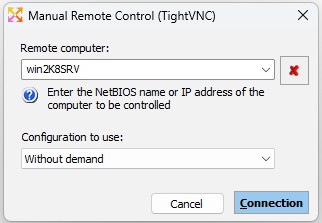
- TightVNC and RDP Remote Control
- You can select the configuration to use when manually taking control of a computer by its name or IP address (Remote Desktop menu \ Connect with a name or IP).
- You can select which configuration to reload or install during a multiple installation (Remote Desktop menu \ Reload Configuration \ Install).
- Active Directory Domain
- Displaying disabled user accounts and computers with a different icon.
- Explorer Window: Access to domain computers is automatically tested and their properties loaded (tooltip).
- Managing user photo: You can view and associate a photo with users in your Active Directory domain. To do this, open the user account properties, General+ tab. Click the Photo button to associate a photo. The photo must be in JPEG format and less than 100kb in size.

- Real Time Audits
- New audit : Users with an associated ID photo.
- Miscellaneous
- Compliance for Windows 11 Version 24H2
- Better integration of Microsoft SQL Express and Microsoft SQL Server for database management
- Improvements and bug fixes.
- TightVNC and RDP Remote Control
-
05/04/2025New features in version 25.1.x
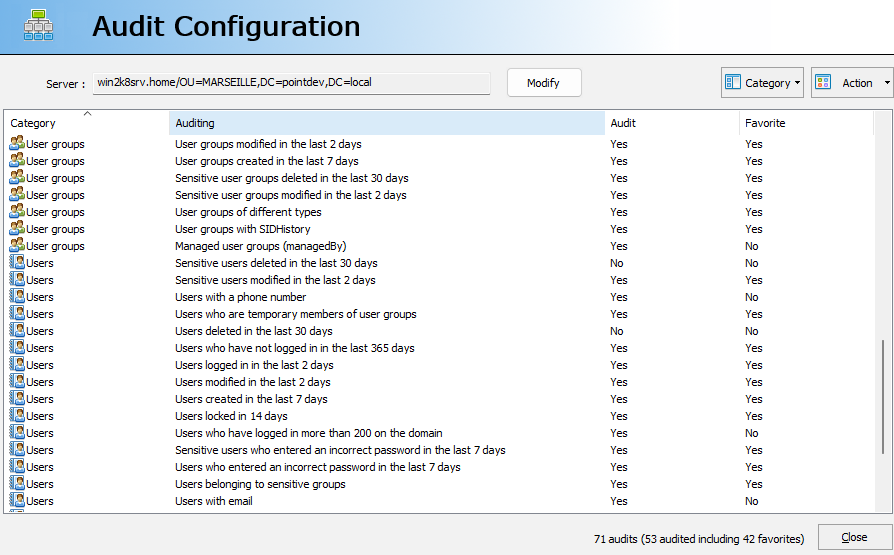
- Real-Time Auditing
- Users with strong authentication (MFA)
- Computers that haven't received an update in x days
- Servers that haven't received an update in x days
- Last schema modification : The schema determines the structure of Active Directory, any changes must be carefully monitored.
- User groups with time-limited (TTL) members : Allows you to track and secure temporary access to resources.
- Changes and deletions made to Sensitive Computers, Sensitive User Groups, and Sensitive Users in your Active Directory domain.
- Sensitive Computers modified in the last x days
- Sensitive Computers deleted in the last x days
- Sensitive User Groups modified in the last x days
- Sensitive User Groups deleted in the last x days
- Sensitive Users modified in the last x days
- Sensitive Users deleted in the last x days
- Sensitive Users who entered an incorrect password in the last x days
- Real-time audits are not automatically started when adding an Active Directory Domain tab if the domain has more than 5,000 computers. This must be started manually. Action menu, Start.
- Possibility to select audits by category: Action menu, Configure, Category
- "New Installation" Configuration
- Your domain and domain controller information is pre-populated (x64 version).
- You can now specify a default OU. This is very useful when you only administer one OU in your organization.
- Windows Microsoft Network
- You can now select an Organization Unit when adding a tab.
- Right-clicking on one or more workstations performs a priority update of the status and properties.
- Active Directory Domain
- When adding an Active Directory Domain tab, the selected organizational unit is automatically configured by default for Real-Time Audit management.
- Compacting the MS Access database
- You can schedule the compacting of the database the next time you restart the application: Tools menu, Options, Database, Compact. MS Access must be present on the workstation running the software.
- Automatic compacting the MS Access database at launch with the mdb exceeds 100mb.
- New handling in multi-threaded loading of lists
New version 25.1.1
- New audits
- Sensitive users with a password that never expires
- Sensitive users without MFA enabled
- Organizational units without manager (managedBy)
- GPOs recently deleted within the last x days
- Users who changed their password less than x days ago
- Support for SQL Server Express 2022 and SQL Server 2022 for database management:
How to configure a SQL Server Express 2022 or SQL Server 2022 database - Various improvements and bug fixes.
- Real-Time Auditing
-
06/01/2025New features in version 25.0.x
- What's new in version 25.0
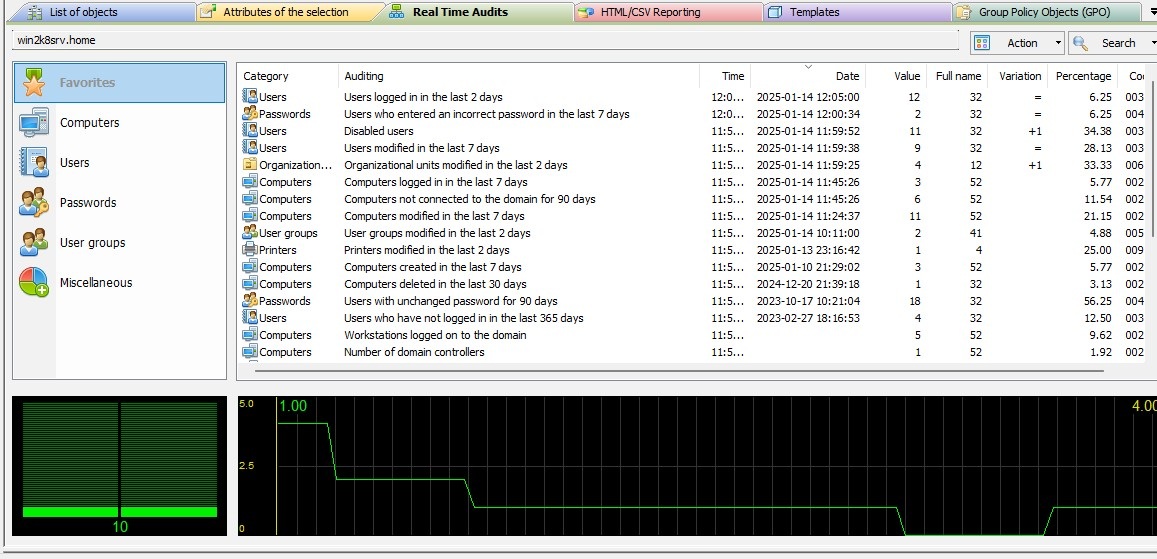
Real-Time Active Directory Audits: With IDEAL Administration, you can already generate detailed reports in CSV or HTML format on the content of your domains. Now, you can monitor and analyze all activities and changes made to your domains in real time.
You can audit more than 70 events in your Active Directory domain or subdomain in order to:- Quickly detect security issues,- Monitor unauthorized changes,- Have a quick diagnosis of incidents,- Check the compliance of your environment with the policy applied in your organization.- A graph representing the event timeline for a graphical representation of audited events.
- A complete visualization/exportation of audited events.
- Full configuration of the audit system (Groups deemed sensitive, number of audited days, etc.)
- No complex settings or agents to install, everything is done automatically from your Active Directory manager.
- Optimized file access management to speed up reading and support multi-threaded access.
- Windows 11 24H2 Management.
- Various improvements and bug fixes.
- What's new in version 25.0.2
- Two new audits have been added: Users with phone / Users temporary members of user groups. The new audits appear with a new icon when the application is launched for the first time.
- You can now display all audits, even those with a value of 0: Action \ Configuration menu, then Action \ Display all audits.
- Automatic management of loss of connection with the server. Audits are stopped and resumed when the connection is reestablished.
- Accelerated loading of domain computers.
- Automatic management of Windows scaling for displaying icons.
- Sorting of columns, when the latter are dates, is now automatically managed.
- The test counter has been set to zero. You can test the application for a new period of 30 days. Important: You must first uninstall the old version.
- What's new in version 25.0.3
- Domain loading has been redesigned to gain display speed.
- You have the option to change the title when exporting to HTML file.
- Audits can be viewed by category in the Configuration section.
- Audit display has been accelerated.
- Migration planning could not run on 64-bit workstations.
- What's new in version 25.0.4
- Real-Time Audits: Automatic sorting by date, if possible, in the event view.
- New installation: Request information when launching the software for simplified pre-configuration.
-
22/05/2024New features in version 23.5
- New database management for accelerated access to our application (64-bit version).
- Role Management: Possibilities to test roles directly under the session of the role manager.
- Preparation for the integration of an Active Directory Dashboard in Real Time. This new function will allow the real-time display of certain data Active Directory that you consider important: Number of computers, number errors in entering passwords, etc., nothing will escape you.
- Performance improvements and bug fixes.
-
30/08/2023New features in version 23.1
- Display of a message when the TightVNC viewer has been blocked by an Antivirus.
- Save/recall "Show Offline Computers" option.
- The preconfigured Message field for the TightVNC remote control did not scroll vertically.
- Stopping a Windows service remotely could generate an error.
- Removed checking of current RDP sessions during mass installation of the TightVNC service.
- Revised NT Rights Management for Windows 11 & >
- Fixed a bug in checking the number of licenses.
- Fixed a bug that caused the selection of a data source (ODBC) when launching the software.
- Acceleration of access to network servers/computers.
- Performance improvements and bug fixes.
-
09/05/2023New features in version 23.0.2
- Roles/Tasks Delegation
- Role delegation allows you to authorize certain functions of our software to people or groups of people without having to give them access to all the features:
( Read our FAQ: https://www.pointdev.com/en/faq/liste-faq-ideal-administration-id-ia-id-227.html ) :- One or more Role Delegation Administrators can create role delegations for different software users.
- Each feature of the software can be controlled by Full Access, Read Only (No modification allowed) or No Access.
- Users no longer have access to the software activation key for software registration, all checks are done automatically when loading role delegation.
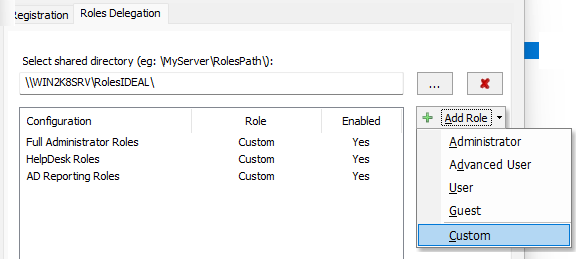
- Role delegation allows you to authorize certain functions of our software to people or groups of people without having to give them access to all the features:
- Terminal Services Sessions
- Ability to add a "Terminal Services Sessions" tab in the main view. You can configure the list of TSE Servers/Computers to manage. You can thus manage all your Terminal Services servers and their RDP sessions from a single window, such as the RDP Shadow remote control for an RDP control with screen sharing.
More information: https://www.pointdev.com/en/faq/faq-ideal-administration-id-1001.html
- Ability to add a "Terminal Services Sessions" tab in the main view. You can configure the list of TSE Servers/Computers to manage. You can thus manage all your Terminal Services servers and their RDP sessions from a single window, such as the RDP Shadow remote control for an RDP control with screen sharing.
- Security
- Reinforced encryption of certain files for increased security. Warning: The configuration files are no longer compatible with previous versions of the software.
- Various
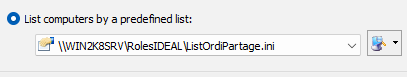
- Configuring Filters: You can configure a shared file to upload a list of computers. The advantage of this feature is to load a file shared by several users. You can thus feed this file only once so that it is used on all the stations running our software. The text file must have the following format: one computer name or one IP address per line.
- Update of the FAQ tab: We have revised the display of FAQs for better ergonomics and added search by keywords.
- Fixed a bug in the Explore permissions of files and directories.
- Fixed a bug in the File and Directory Migration function if the folder exceeded the maximum length of 255 characters.
- Acceleration of access to network servers/computers.
- Updated redistribuable database drivers (Office 2016).
- Management of column sorting for Favorites/VPN tabs.
- Fixed a bug when encrypting passwords containing accents.
- Fixed a bug in export/import of TightVNC configurations.
- Performance improvements.
- Configuring Filters: You can configure a shared file to upload a list of computers. The advantage of this feature is to load a file shared by several users. You can thus feed this file only once so that it is used on all the stations running our software. The text file must have the following format: one computer name or one IP address per line.
- Roles/Tasks Delegation
-
03/01/2023New features in version 21.90
- Windows Server 2022
- Consideration of Windows Server 2022.
- Remote Control Tool
- Detection of current RDP sessions and disconnection of these on request when taking control of client/server workstations.
- Various
- Fixed a bug in Computer Properties management (x64 version).
- Computers in a domain under SAMBA were not listed automatically.
- Bug fixes and performance improvements.
- Windows Server 2022
-
17/10/2022New features in version 21.85
- Windows 11 22H2 (October 2022)
- Consideration of the latest version of Windows 11, called 22H2, and available from October 2022.
- Visual Studio 2022
- The 32-bit and 64-bit versions of our administration tool have been compiled with the latest version of Microsoft's Visual Studio 2022 guaranteeing compliance with current development standards.
- Various
- Acceleration of taking into account the right click on a client computer in the "Explorer" type window (left).
- Automatic memorization of window size.
- Bug fixes and performance improvements.
- Windows 11 22H2 (October 2022)
-
24/08/2022New features in version 21.82
- WMI (Windows Management Instrumentation)
- Ability to manage new WMI Classes in the list of domain computers, in the database inventories as well as in the WMI manager.
- Remote command prompt
- The Remote Command Prompt could generate an error when launched on Windows 10 Pro.
- TightVNC Remote Control
- The remote control takeover could generate an error during the first installation on Windows 10 Pro.
- GUI (64-bit version only)
- The GUI has been improved, but only for the 64-bit version of the software.
- Various
- Improved app stability.
- The remote tools command line was automatically changed to lowercase. Which was a problem if it took into account lowercase / uppercase.
- Right-clicking on a disk drive could cause the software to stop.
- Disconnecting open files (Print and Sharing Center) could return an error.
- Bug fixes and performance improvements.
- WMI (Windows Management Instrumentation)
-
24/03/2022New features in version 21.75
- TightVNC Remote Control
- Integration of the v2.8.63 version of the TightVNC Viewer
- Fixed Copy/Paste issue when multiple remote control sessions are running
- WMI Properties
- Remote Command Prompt (x64)
- New management for more compatibility with 64-bit systems
- Windows 11
- Adjusted some functions for better compatibility with the new Microsoft OS
- Corrections
- RDP Shadow sessions could not be listed
- Updating FAQs
- Some other minor fixes and improvements
- TightVNC Remote Control
-
08/11/2021New features in version 21.55
- TightVNC Remote Control
- Integration of the latest version of TighVNC (v2.8.59)
- Installation and start of the remote control service via WMI in order to avoid certain slowdowns
- New faster management for adding exceptions in remote firewalls (Windows 7 &>)
- Automatic authorization of the WMI protocol during the first remote control of a workstation
- Viewing the file copy errors when installing TightVNC
- Remote control of RDP Sessions. This function can be enabled by TightVNC Settings (Control/Deploy menu), Advanced tab, Connect to RDP option.
- Correction in the Copy / Paste functions
- Correction in the transmission of certain characters (Alt Gr key)
- The performance of file transfers has been improved, and in particular the list of contents of large folders
- Acceleration of remote control by better management of recent operating systems
- Wake On Lan
- The management of Wake On Lan (computer wake-up) has been revised in order to gain speed
- Loading selected computers
- List of computers in the domain
- Disabled computers are no longer listed by default. You can reactivate their display by the option: Tools \ Options \ General \ List disabled computers
- Windows 11 computers are now supported
- Active Directory Reports
- Default addition of certain properties when creating a report:
- whencreated: date of creation of the object
- whenchanged: last modification of the object
- canonicalName: DNS domain name format
- Reminder: You can customize the AD properties to export in your reports, for this use the Advanced button when creating reports
- Reports are automatically displayed in the web browser after generation
- Default addition of certain properties when creating a report:
- Deployment of distributions
- Actions in error are highlighted when viewing reports
- Some distributions might not be listed
- Corrections
- Wake On Lan information was not automatically saved in the database
- The size of text fields (REG_SZ) in the registry manager has been increased
- The exports of the lists did not take into account the carriage returns that may be present in the lists
- RemoteRegistry and WMI alerts displayed were blocking the display of the list of computers in the domain
- Configuring multiple Microsoft Windows Network tabs could cause the software to crash
- The remote registry manager could generate an error while deleting a value
- The new WMI management could cause the software to stop when taking control
- Remote control by WMI has been accelerated
- Updating FAQs
- Some other minor fixes and improvements
- TightVNC Remote Control
-
31/03/2021New features in version 21.13
- Domain computers
- Possibility to search for a character string in the list of computers with a Next / Previous option. The column and the string found are indicated in a field.
- Updating information about the computer when right-clicking on this latest. This function allows you to update information such as statuses, and the information configured without requiring a complete update.
- Deployment of distributions
- Selection of the execution order of the distributions if several distributions selected.
- Sharing and printing center
- Automatic addition of the IP present as a port as the printer management URL : right click on your print server, Print and Sharing Center, tab Printers, right click on the printer, Web administration interface.
- Disabling the SMB1 Protocol
- This new version takes into account the default deactivation of the SMB1 protocol in newer versions of Windows. The SMB1 protocol allows in particular the recovery of domains and domain controllers present on the network via the NetBIOS protocol. We have changed our application so that this setting can be done manually.
- You can see our FAQ on this subject: https://www.pointdev.com/en/faq/faq-ideal-administration-no-client-information-display-data-slow-windows-10-right-view-smb1-id-991.html
- Visual Studio 2019
- We are now working with the latest version of Microsoft's Visual Studio to develop our administration tool guaranteeing security and speed increased execution, as well as compliance with development standards.
- Corrections
- Unable to select a user when adding a remote network drive.
- Cannot set up a new MS Access or MS SQL database.
- Changing the number of processes for the database management was not taken into account.
- Disabling alert messages regarding the Remote Registry Access service and WMI when choosing "I understand ...".
- Automatic updating of the current domain when a domain name is configured.
- Adding Interventions could generate a bdd error (x64 version).
- Fixed display of some icons (x86 and x64 versions).
- Some minor fixes and improvements.
- Domain computers
-
08/10/2020New features in version 21.0
This new version is the first offered in 64 bits for more compatibility and speed.
IMPORTANT: IDEAL Administration 21.0 64 bits is installed in the "Program Files" directory and not "Program Files (x86)" for the 32-bit version, which allows you to keep your old version and configuration of IDEAL Administration. It is therefore not necessary to uninstall your 32-bit version.
You can check which version you are using from the software title bar. The x64 version indicates "IDEAL Administration 21 (x64)".
You can also export / import your 32-bit configuration into the new 64-bit version using the menu "File", "Export settings..." and "Import settings..."
This version uses the 64-bit MS Access drivers, which means that you need to have these drivers installed on your administration station. If you don't have them, you will get an error message when launching the software.
These drivers can be downloaded for free (distributable) from the Microsoft site:
https://www.microsoft.com/en-us/download/details.aspx?id=13255Once the executable has been downloaded, open the MS-DOS prompt then start the installation of the package with the command /passive: AccessDatabaseEngine_X64.exe /passive
Consult our FAQ for more information:
https://www.pointdev.com/en/faq/faq-ideal-administration-how-correct-error-64-bit-driver-id-1016.html -
25/08/2020New features in version 20.5
You wish to inform us of a technical problem or a new function that you would like to see in IDEAL Administration, send an email to support@pointdev.com
- SOFTWARE DEPLOYMENTS
- You can now select multiple distributions to run on a set of computers.
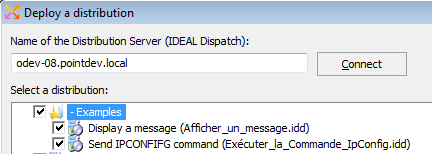
- You can now select multiple distributions to run on a set of computers.
- SHADOW REMOTE CONTROL
- We added the ability to run RDP SHADOW mode without permission request for the remote user. This mode requires setting up a GPO.
- Find all the information on RDP SHADOW functions in our online FAQ:
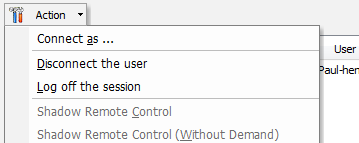
https://www.pointdev.com/en/faq/faq-ideal-administration-how-take-control-terminal-server-session-rdp-shadow-mode-id-1001.html - Possibility of performing searches in the tabs found in the Printing and Sharing Center: Action \ Search menu or right click on a column name, then Search. You can, for example, quickly find the user name and initiate a remote session.
- MICROSOFT WINDOWS NETWORK RESEARCH
- The search in the list is no longer done only on the computer name, you can now select the columns in which to perform the search. These columns will be automatically recalled when the software is launched.
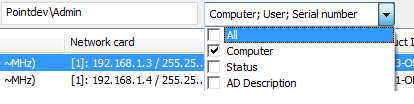
- The search in the list is no longer done only on the computer name, you can now select the columns in which to perform the search. These columns will be automatically recalled when the software is launched.
- ACTIVE DIRECTORY REPORTS (REPORTING)
- We've added a new Open in Browser button when viewing Active Directory reports. This button opens the HTML report in your Internet browser.
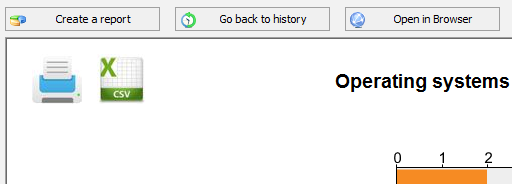
- We've added a new Open in Browser button when viewing Active Directory reports. This button opens the HTML report in your Internet browser.
- SOME CORRECTIONS
- The software could generate an error while creating an HTML report.
- The RDP SHADOW mode present in the Print and Sharing Center returned an incorrect session ID error.
- Some minor fixes.
- SOFTWARE DEPLOYMENTS
A partir de 389 € (EUR)
Ver toda la lista de preciosCompatible con
- Windows Server 2025
- Windows Server 2022
- Windows Server 2019
- Windows Server 2016
- Windows Server 2012
- Windows Server 2008
- Windows 11
- Windows 10
- Windows 8
Disponible en
IDEAL ADMINISTRATION 26.8.5
SOFTWARE
SERVICIOS
MAPA DEL SITIO
POINTDEV
ESPACE REVA2 ALLEE JOSIME MARTIN
13160 CHATEAURENARD
FRANCE


