


 Français
 English
 Deutsch
 Italiano
 Русский

Espace Reva
2 allée Josime MARTIN
13160 CHATEAURENARD
FRANCE
Tel. : 33 9 77 63 61 94
Fax : 33 4 32 62 71 35 Tel.: 33 9 77 63 61 94

FAQ : IDEAL REMOTE
Tome el control remoto de todos sus sistemas de forma sencilla y segura
Software License InformationHow do I remove my registration key? |
How to deactivate my license on my admin computer? |
|
To deactivate your license you can:
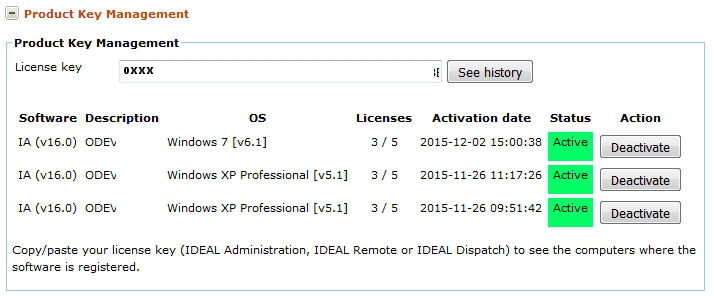
If you are unable to remove your key (e.g. Computer failure or malfunction, Inoperative Internet connection, ...), please follow this procedure:
OR
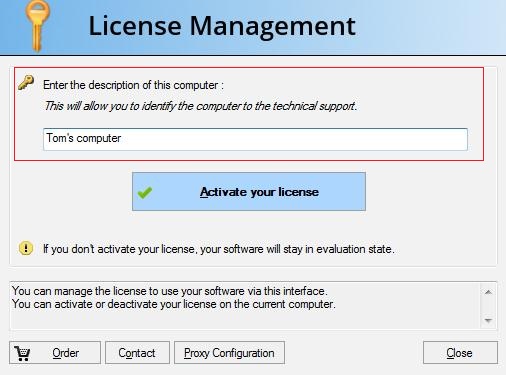
Note: If you are unable to remove your key on your computer or have problems during the deactivation phase for one of the following reasons: - Computer failure or malfunction. - Hard disk or hardware replacement. - Inoperative Internet connection. - Problem related to the software uninstallation. Please contact our technical support by providing the following information : - Reason of the problem with the license removal. - Registration key bound to the computer. - Name of the company for which the license was granted. - Description of the computer, filled when activating your license (see at the bottom of the page). Based on this information, we will manually disable your license. |
| También afecta al software siguiente: IDEAL ADMINISTRATION | IDEAL DISPATCH |
| Última modificación: 27/01/2022 |
¿Quiere comprobarlo usted mismo? Pruebe IDEAL REMOTE gratis durante 30 días.
Sin compromiso • Sin agente • Soporte incluido • Listo en 5 minutos


IDEAL REMOTE 26.8
DESCARGAR PRUEBA GRATIS 30 DÍAS
SOFTWARE
SERVICIOS
MAPA DEL SITIO
POINTDEV
ESPACE REVA2 ALLEE JOSIME MARTIN
13160 CHATEAURENARD
FRANCE


