


 Français
 English
 Deutsch
 Italiano
 Русский
RustDesk Error: RustDesk rendezvous server is unreachable
When I try to take control of a remote computer using RustDesk, a dialog box appears indicating that the RustDesk rendezvous server is unreachable. Why does this dialog box appear, and how can I fix the issue?
❓ Why does this window appear?
This window appears when the administration workstation is unable to establish an outgoing connection to the RustDesk rendezvous server.
Example displayed:
Server: rs-ny.rustdesk.com
Port: 21116 (TCP)
Detail: Timeout (WSAETIMEDOUT)
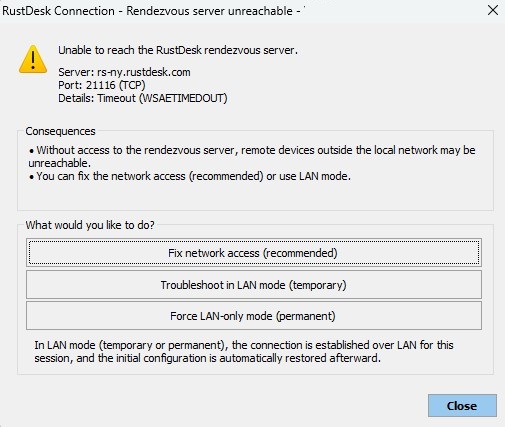
This generally means that the Internet connection on this port is:
- blocked by a firewall
- filtered by a proxy
- restricted by a security policy
- or that a DNS issue is preventing the server name from being resolved
Without access to the rendezvous server, connections via ID (access outside the local network) may fail.
What is the rendezvous server?
The RustDesk rendezvous server allows:
- connection by ID
- access to devices located outside the local network
- management of Internet-based connections
- use of relay servers if necessary
If it is unreachable, only direct local network (LAN) connections will work.
How to fix the issue?
1. Check network connectivity
From the administration workstation, run:
Test-NetConnection rs-ny.rustdesk.com -Port 21116
If the test fails:
- Check the local Windows firewall
- Check the corporate firewall
- Check outbound filtering rules
- Ensure that no proxy is blocking the connection
2. Check DNS
Run:
nslookup rs-ny.rustdesk.com
If the IP address does not resolve:
- Check DNS configuration
- Ensure the network allows Internet access
3. Check corporate security policies
In some environments:
- Non-standard outbound ports are blocked
- Only ports 80/443 are allowed
- An authenticated proxy is required
In this case, you will need to:
- Allow TCP port 21116 to the Internet
- Or use an internal RustDesk server
How to use LAN mode?
If Internet access cannot be allowed, you can use LAN mode.
Mode "Troubleshoot in LAN (temporary)"
The connection is established only over the local network
No communication with the rendezvous server
Works only if devices are:
- on the same LAN
- or connected via VPN
At the end of the session, the initial configuration is automatically restored.
Mode "Force LAN-only"
All connections will be made exclusively over the local network
No access via ID or Internet server
Recommended in:
- secured environments
- isolated networks
- infrastructures without Internet access
⚠ Devices located outside the local network will not be accessible.
When should LAN mode be used?
Use LAN mode if:
- Devices are on the same local network
- You are connected via VPN to the remote site
- Your company blocks outbound connections
- You are working in an isolated (air-gapped) environment
When should LAN mode NOT be used?
Do not use LAN mode if:
- You need to access devices from the Internet
- Devices are located on multiple sites without VPN
- You use ID-based connection exclusively
Best practices
- Allow access to the rendezvous server for optimal operation
- Use LAN mode only when necessary
- Document firewall rules if used in a corporate environment
- Test network connectivity before large-scale deployment
Secured environment?
If your organization prohibits all Internet communication:
- LAN mode is the recommended mode
- You can also deploy an internal RustDesk server