


 Français
 English
 Deutsch
 Italiano
 Русский

POINTDEV
Espace Reva
2 allée Josime MARTIN
13160 CHATEAURENARD
FRANCE
Tel. : 33 9 77 63 61 94
Fax : 33 4 32 62 71 35 Tel.: 33 9 77 63 61 94
Espace Reva
2 allée Josime MARTIN
13160 CHATEAURENARD
FRANCE
Tel. : 33 9 77 63 61 94
Fax : 33 4 32 62 71 35 Tel.: 33 9 77 63 61 94

FAQ : IDEAL DISPATCH
Implemente, ejecute y gestione sus acciones IT de forma remota desde una única interfaz
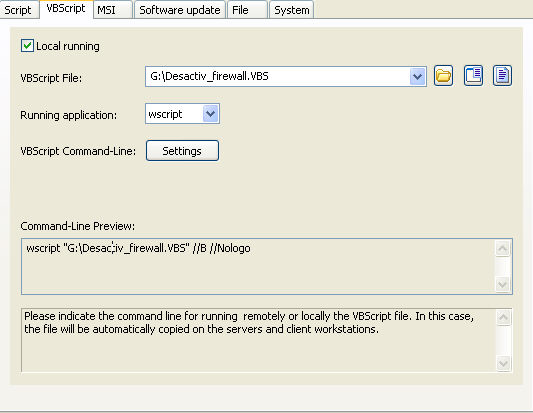
Some examples of deployments by using IDEAL DispatchVBScript Action: Deactivating the Firewall by running a VBScript locally |
Example n°8: Deactivating the Firewall by running a VBScript locally |
|
Running locally means that the file to be read or run will be copied automatically to all servers and workstations involved in the distribution. Description: This VBS script deactivates the firewall in XP SP2. Script: Set objFirewall = CreateObject("HNetCfg.FwMgr") You must configure the following arguments:
|
| Última modificación: 04/05/2009 |
¿Quiere comprobarlo usted mismo? Pruebe IDEAL DISPATCH gratis durante 30 días.
DESCARGAR VERSIÓN DE PRUEBA 30 DÍAS
Sin compromiso • Sin agente • Soporte incluido • Listo en 5 minutos

Anterior

Siguiente
Vuelve a la lista

IDEAL DISPATCH 9.9
DESCARGAR PRUEBA GRATIS 30 DÍAS
SOFTWARE
SERVICIOS
MAPA DEL SITIO
POINTDEV
ESPACE REVA2 ALLEE JOSIME MARTIN
13160 CHATEAURENARD
FRANCE


