


 Français
 English
 Deutsch
 Italiano
 Русский

POINTDEV
Espace Reva
2 allée Josime MARTIN
13160 CHATEAURENARD
FRANCE
Tel. : 33 9 77 63 61 94
Fax : 33 4 32 62 71 35 Tel.: 33 9 77 63 61 94
Espace Reva
2 allée Josime MARTIN
13160 CHATEAURENARD
FRANCE
Tel. : 33 9 77 63 61 94
Fax : 33 4 32 62 71 35 Tel.: 33 9 77 63 61 94

FAQ : IDEAL DISPATCH
Implemente, ejecute y gestione sus acciones IT de forma remota desde una única interfaz
What are the different possible actions during deployments?How to deploy the modification of the UAC level on your network? |
How to deploy the modification of the UAC level on your network? |
|
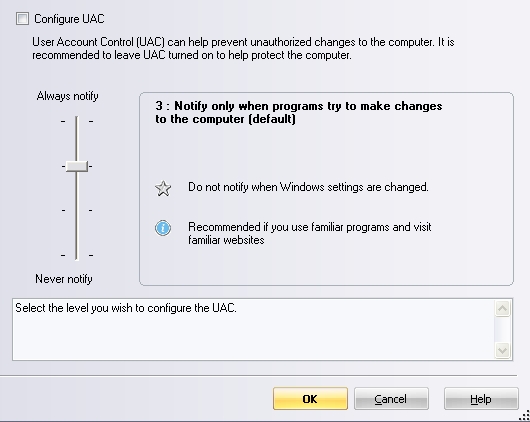
This action allows you to change the UAC level of a target computer using Windows Vista, Windows 7, Windows 2008 Server, Windows 8, Windows 2012 Server. Select the UAC level using the vertical cursor. On computers using Windows Vista, UAC only allows two states: "active" or "inactive". The deactivation of the UAC (level 1: never notify) may need to restart the computer to be effective.
|
| Última modificación: 07/10/2013 |
¿Quiere comprobarlo usted mismo? Pruebe IDEAL DISPATCH gratis durante 30 días.
DESCARGAR VERSIÓN DE PRUEBA 30 DÍAS
Sin compromiso • Sin agente • Soporte incluido • Listo en 5 minutos

Anterior

Siguiente
Vuelve a la lista

IDEAL DISPATCH 9.9
DESCARGAR PRUEBA GRATIS 30 DÍAS
SOFTWARE
SERVICIOS
MAPA DEL SITIO
POINTDEV
ESPACE REVA2 ALLEE JOSIME MARTIN
13160 CHATEAURENARD
FRANCE


