


 Français
 English
 Deutsch
 Italiano
 Русский

POINTDEV
Espace Reva
2 allée Josime MARTIN
13160 CHATEAURENARD
FRANCE
Tel. : 33 9 77 63 61 94
Fax : 33 4 32 62 71 35 Tel.: 33 9 77 63 61 94
Espace Reva
2 allée Josime MARTIN
13160 CHATEAURENARD
FRANCE
Tel. : 33 9 77 63 61 94
Fax : 33 4 32 62 71 35 Tel.: 33 9 77 63 61 94

FAQ : IDEAL ADMINISTRATION
Controle su Active Directory en tiempo real, sin agentes
How to perform Real-Time Audit of Active Directory Domains?How to view audited events? |
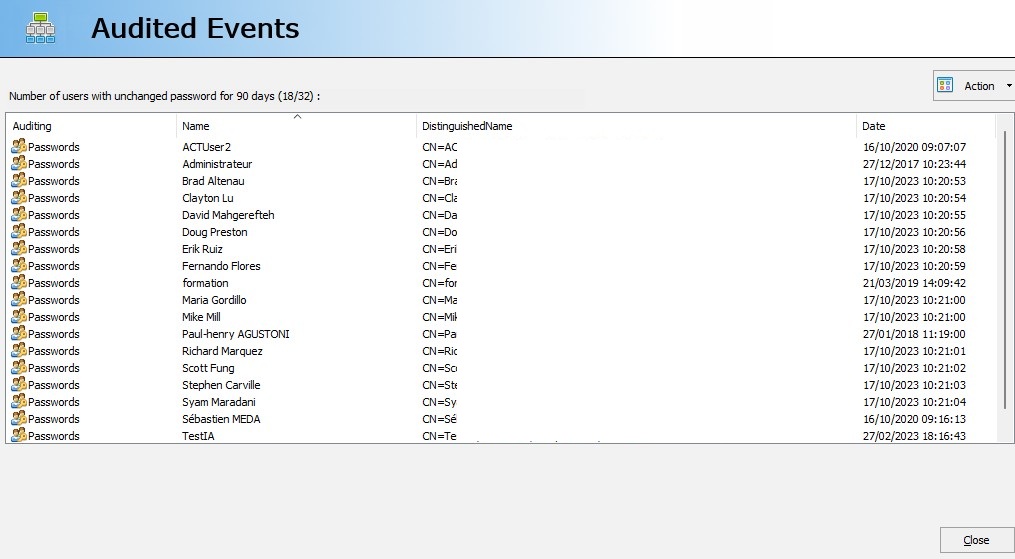
I want to view audited events. Your software indicates that a computer was recently modified, but I would like to know which one. How do I do this? |
|
To view the audited events, double-click on the event in question, or "Action", "View". For example, "Number of computers modified in the last 2 days". A dialog box shows you all the events corresponding to the audit in question.
|
| Última modificación: 13/01/2026 |
¿Quiere comprobarlo usted mismo? Pruebe IDEAL ADMINISTRATION gratis durante 30 días.
DESCARGAR VERSIÓN DE PRUEBA 30 DÍAS
Sin compromiso • Sin agente • Soporte incluido • Listo en 5 minutos

Anterior

Siguiente
Vuelve a la lista

IDEAL ADMINISTRATION 26.8.5
DESCARGAR PRUEBA GRATIS 30 DÍAS
SOFTWARE
SERVICIOS
MAPA DEL SITIO
POINTDEV
ESPACE REVA2 ALLEE JOSIME MARTIN
13160 CHATEAURENARD
FRANCE


