


 Français
 English
 Deutsch
 Italiano
 Русский

Espace Reva
2 allée Josime MARTIN
13160 CHATEAURENARD
FRANCE
Tel. : 33 9 77 63 61 94
Fax : 33 4 32 62 71 35 Tel.: 33 9 77 63 61 94

FAQ : IDEAL ADMINISTRATION
Controle su Active Directory en tiempo real, sin agentes
How do I configure Role/Task Management?How to configure the software in role delegation mode? |
How do you configure your software to use role delegation? |
|
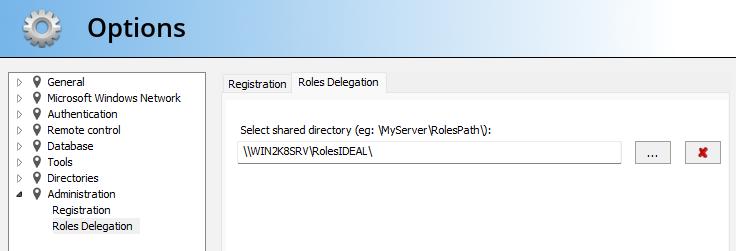
For an IDEAL Administration or IDEAL Remote user, it's very simple, all he has to do is launch the application and define the shared directory in which the role delegation(s) are located. menu "Tools", "Options", "Role delegation". If the directory contains at least one role delegation, the software suggests that you be restarted so that it is taken into account for the user. The user can check the delegation of roles loaded when launching the software by the title bar or by the menu "Tools", "Options", "Registration".
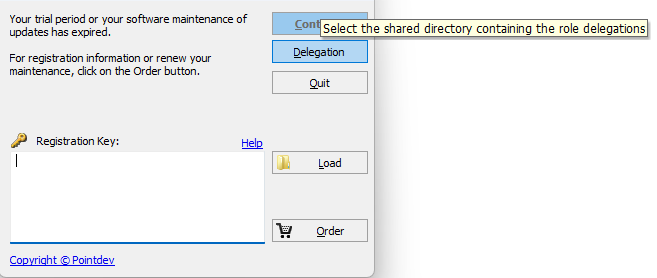
You also have the option of selecting the shared directory to use for role delegations using the "Delegation" button, offered when launching the software.
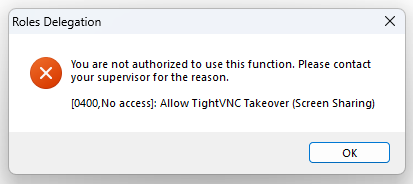
The blocking of functionalities in the software is done automatically according to the role delegation loaded. When the user tries to perform an unauthorized function, the dialog box below appears:
|
| También afecta al software siguiente: IDEAL REMOTE |
| Última modificación: 02/03/2023 |
¿Quiere comprobarlo usted mismo? Pruebe IDEAL ADMINISTRATION gratis durante 30 días.
Sin compromiso • Sin agente • Soporte incluido • Listo en 5 minutos


IDEAL ADMINISTRATION 26.8.5
DESCARGAR PRUEBA GRATIS 30 DÍAS
SOFTWARE
SERVICIOS
MAPA DEL SITIO
POINTDEV
ESPACE REVA2 ALLEE JOSIME MARTIN
13160 CHATEAURENARD
FRANCE


