


 Français
 English
 Deutsch
 Italiano
 Русский

Espace Reva
2 allée Josime MARTIN
13160 CHATEAURENARD
FRANCE
Tel. : 33 9 77 63 61 94
Fax : 33 4 32 62 71 35 Tel.: 33 9 77 63 61 94

FAQ : IDEAL Alerter
Supervisión, alerta y reacción en servidores y estaciones de trabajo Windows
Examples of alertsDaily copy and save a directory |
Alert : How to automatically copy and save a directory ? |
|
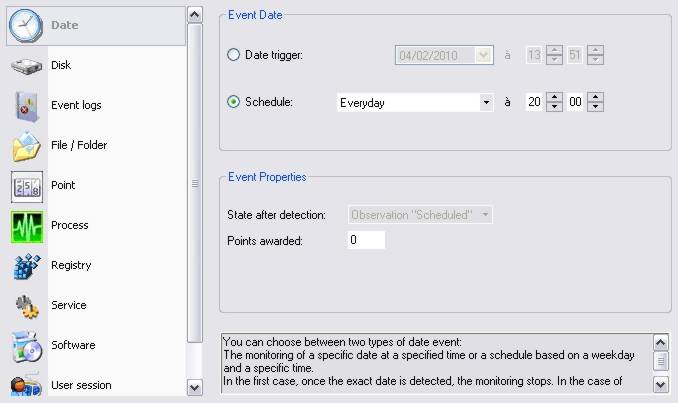
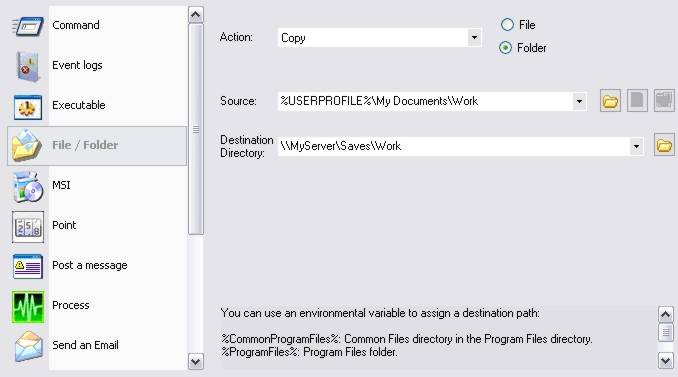
This example describes the procedure to use in order to copy every evening at 20:00, the working directory of the user on a centralized resource (a domain server here) This topic can also be used as a starting point to automate in a regular way the local or remote copy of directory. The approach will be then relatively similar, the startup date and the path of the source / destination directories will have to be modified..
The date event will be daily activated at 20:00.
The whole content of the \Documents and Settings\UserName\Work (use of the "%USERPROFILE%" environment variable) will be then copied on the server.
|
| Última modificación: 10/02/2010 |
¿Quiere comprobarlo usted mismo? Pruebe IDEAL Alerter gratis durante 30 días.
Sin compromiso • Sin agente • Soporte incluido • Listo en 5 minutos


IDEAL Alerter 2.0
SOFTWARE
SERVICIOS
MAPA DEL SITIO
POINTDEV
ESPACE REVA2 ALLEE JOSIME MARTIN
13160 CHATEAURENARD
FRANCE


