FAQ : IDEAL REMOTE

Take remote control of all your systems, simply and securely

Search Help  

FAQ: Help

By using this search engine, you can search one or more terms in the complete Pointdev FAQ.

  • In order to look for one or more keywords, type them in the search field using space to separate them.

    ex : remote control

    This search will show you every FAQ containing the word "remote" OR "control".

  • In order to look for a full sentence, use the quotes " " around your keywords
  • ex : "remote control"

    This search will show you every FAQ containing the whole word "remote control".


 Title and Content
 Title only

How to configure the TightVNC remote control tool (screen sharing)?

How to manage Kaspersky Anti-Virus interface via the TightVNC remote control?

I cannot manage Kaspersky Anti-Virus interface via your remote control tool, why?


Try IDEAL Administration during 30 days on your network for free!

Simplify your VNC Installation and Remote Control with IDEAL Administration

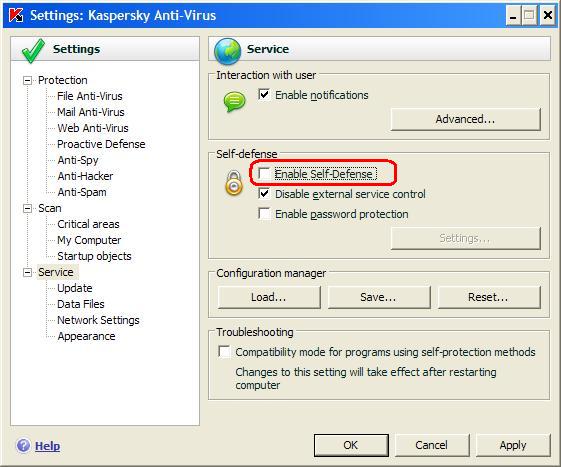
Kaspersky contains a "Self-defense" protection.

This protection needs to be disabled in the anti-virus configuration before accessing Kapersky interface from the remote control tools.

For more information, you can consult the original article at http://support.kaspersky.com/faq/?qid=208279320
Also concerns the following software: IDEAL ADMINISTRATION
Last modification: 09/17/2019

Want to check for yourself? Try IDEAL REMOTE free for 30 days.

DOWNLOAD FREE 30-DAY TRIAL

No commitment • No agent • Support included • Ready to use in 5 minutes


Previous
   
Next

Back to the list


FAQ : IDEAL ADMINISTRATION | IDEAL DISPATCH | IDEAL REMOTE | IDEAL MIGRATION


IDEAL REMOTE 26.5.5
DOWNLOAD FREE 30-DAY TRIAL
Back to top