


 Français
 Español
 Deutsch
 Italiano
 Русский

POINTDEV
Espace Reva
2 allée Josime MARTIN
13160 CHATEAURENARD
FRANCE
Tel : 33 9 77 63 61 94
Fax : 33 4 32 62 71 35 Tel: 33 9 77 63 61 94
Espace Reva
2 allée Josime MARTIN
13160 CHATEAURENARD
FRANCE
Tel : 33 9 77 63 61 94
Fax : 33 4 32 62 71 35 Tel: 33 9 77 63 61 94

FAQ : IDEAL DISPATCH
Deploy, execute and manage your IT actions remotely from a single interface
Some examples of deployments by using IDEAL DispatchCommand Action: Running the IPConfig command |
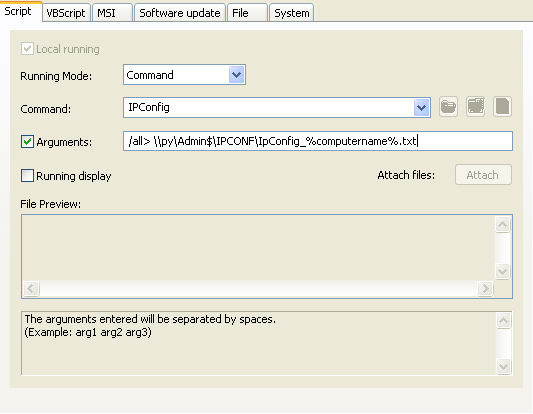
Example n°1: Running the IPConfig command |
|
You must configure the following arguments:
|
| Last modification: 04/16/2010 |
Want to check for yourself? Try IDEAL DISPATCH free for 30 days.
DOWNLOAD FREE 30-DAY TRIAL
No commitment • No agent • Support included • Ready to use in 5 minutes

Previous

Next
Back to the list

IDEAL DISPATCH 9.9
DOWNLOAD FREE 30-DAY TRIAL
SOFTWARE
SERVICES
SITEMAP
POINTDEV
ESPACE REVA2 ALLEE JOSIME MARTIN
13160 CHATEAURENARD
FRANCE


