
 English
 French
 Spanish
 German
 Italian
 Russian

Espace Reva
2 allée Josime MARTIN
13160 CHATEAURENARD
FRANCE
Tel : 33 9 77 63 61 94
Fax : 33 4 32 62 71 35 Tel: 33 9 77 63 61 94

FAQ : IDEAL ADMINISTRATION
Manage your Windows Active Directory environments and Workgroups from a single consoleWith IDEAL ADMINISTRATION 2026, Active Directory administration becomes even more comprehensive. Proactive detection, intelligent alert analysis powered by Cloud AI, decision support, and now secure remote control with RustDesk, all agentless, for centralized, efficient, and fully controlled administration. ⬇️ 30-day free version.
How to use the RustDesk remote control tool in IDEAL ADMINISTRATION?RustDesk rendezvous server is unreachable |
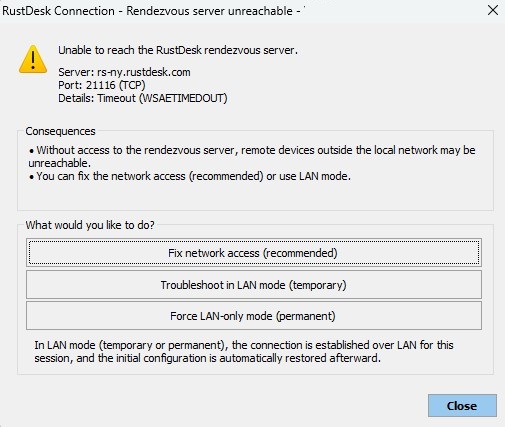
When I try to take control of a remote computer using RustDesk, a dialog box appears indicating that the RustDesk rendezvous server is unreachable. Why does this dialog box appear, and how can I fix the issue? |
❓ Why does this window appear?This window appears when the administration workstation is unable to establish an outgoing connection to the RustDesk rendezvous server. Example displayed: Server: rs-ny.rustdesk.com
This generally means that the Internet connection on this port is:
Without access to the rendezvous server, connections via ID (access outside the local network) may fail.
What is the rendezvous server?The RustDesk rendezvous server allows:
If it is unreachable, only direct local network (LAN) connections will work.
How to fix the issue?1. Check network connectivity From the administration workstation, run: Test-NetConnection rs-ny.rustdesk.com -Port 21116 If the test fails:
2. Check DNS Run: nslookup rs-ny.rustdesk.com If the IP address does not resolve:
3. Check corporate security policies In some environments:
In this case, you will need to:
|
| Also concerns the following software: IDEAL REMOTE |
| Last modification: 02/21/2026 |


IDEAL ADMINISTRATION 26.5.1
DOWNLOADFREE 30-DAY TRIAL
SOFTWARE
SERVICES
SITEMAP
POINTDEV
ESPACE REVA2 ALLEE JOSIME MARTIN
13160 CHATEAURENARD
FRANCE


