


 Français
 Español
 Deutsch
 Italiano
 Русский

Espace Reva
2 allée Josime MARTIN
13160 CHATEAURENARD
FRANCE
Tel : 33 9 77 63 61 94
Fax : 33 4 32 62 71 35 Tel: 33 9 77 63 61 94

FAQ : IDEAL ADMINISTRATION
Control your Active Directory in real time, without agents
How to use the RustDesk remote control tool in IDEAL ADMINISTRATION?Why and how should I use the secure Pointdev RustDesk server? |
I would like to use Pointdev’s secure RustDesk server instead of the public RustDesk server. Is this possible, and under what conditions? |
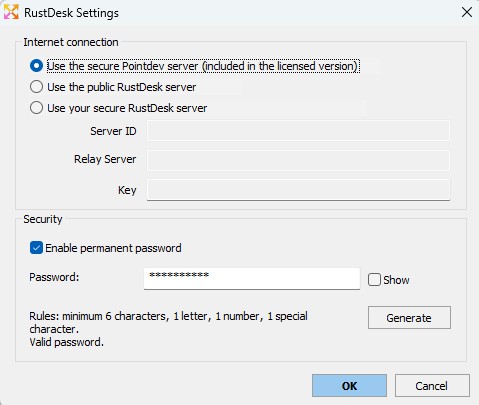
➡️ What is the benefit of the secure Pointdev RustDesk server integrated into IDEAL ADMINISTRATION ?Since version 26.7, IDEAL ADMINISTRATION can use the secure Pointdev RustDesk server, included for customers with a valid license. This new feature provides better control over remote access connections, especially when workstations are not accessible only through the local network or when administrators need to connect remotely over the Internet. In practice, IDEAL ADMINISTRATION now lets you choose which RustDesk server is used for Internet-based connections :
The RustDesk server used can therefore be adapted to each company’s technical, network and security requirements. The main advantages of the secure Pointdev RustDesk server are as follows :
For organizations that already have their own RustDesk infrastructure, IDEAL ADMINISTRATION also lets you manually enter the server information :
This option is particularly useful for companies that want to host their own RustDesk server, enforce their own security policy, or further isolate their remote access infrastructure. IDEAL ADMINISTRATION therefore centralizes RustDesk configuration and allows administrators to choose the most suitable mode : Pointdev server, public RustDesk server or custom internal server. This enhancement strengthens RustDesk integration in IDEAL ADMINISTRATION and turns remote control into a better managed, more flexible feature, better suited to professional environments.
|
| Last modification: 05/13/2026 |
Want to check for yourself? Try IDEAL ADMINISTRATION free for 30 days.
No commitment • No agent • Support included • Ready to use in 5 minutes


IDEAL ADMINISTRATION 26.8.5
DOWNLOAD FREE 30-DAY TRIAL
SOFTWARE
SERVICES
SITEMAP
POINTDEV
ESPACE REVA2 ALLEE JOSIME MARTIN
13160 CHATEAURENARD
FRANCE


