


 Français
 Español
 Deutsch
 Italiano
 Русский
How to use Active Directory templates to automate object's creation?
How to use Active Directory templates?
First, download the free 30 day version of our software if you have not installed it yet: Download IDEAL Administration.
Once installed, just execute it under a domain admin account.
On the right view, select Active Directory Network tab, and the Templates.
The "Templates" tab allows to manage and create templates on your Active Directory objects to simplify their creation.
Indeed, when creating an Active Directory object you can select an existing template to prefill the different attributes (right click in the Active Directory view then "New from template").
Liste des templates:
- Organizational Units
- User groups
- Domain users
- Contacts
Example : To create an OU template:
- Click the "Create a template" button from the "Templates" tab.
- Select Organizational Unit.
- Enter the title, description and the destination folder of the template.
- Click "Next" to access the property sheet of the organizational unit.
- Fill in the different attributes then click "OK".
Once the template has been created, you can create an Active Directory object from this model.
Example: To create an Organizational Unit object from a template
- Right click in the "Active Directory Network" tab then "New from a template", "Organizational Unit".
- Select the concerned template in the following window then click Select.
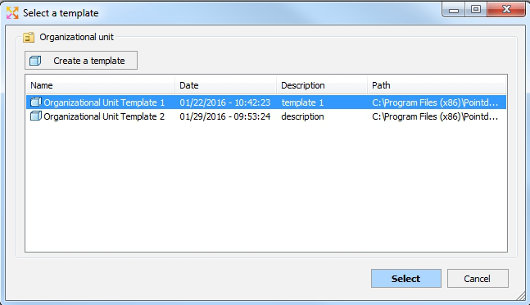
- The property sheet of the organizational unit opens, showing you the different attributes that are pre-filled, based on the template. You can edit and fill in these attributes.
- Click "OK" to create the Organizational Unit.


