FAQ : IDEAL ADMINISTRATION

Manage your Windows Active Directory environments and Workgroups from a single console

Search Help  

FAQ: Help

By using this search engine, you can search one or more terms in the complete Pointdev FAQ.

  • In order to look for one or more keywords, type them in the search field using space to separate them.

    ex : remote control

    This search will show you every FAQ containing the word "remote" OR "control".

  • In order to look for a full sentence, use the quotes " " around your keywords
  • ex : "remote control"

    This search will show you every FAQ containing the whole word "remote control".


 Title and Content
 Title only

IDEAL ADMINISTRATION 2026 is out!

With IDEAL ADMINISTRATION 2026, Active Directory administration takes a new step forward. This version emphasizes proactive detection, intelligent alert analysis using Cloud AI, and decision support, while maintaining simplicity, efficiency, and agentless administration. ⬇️ 30-day free version.


How to perform Real-Time Audit of Active Directory Domains?

How to stop real-time auditing of events?

I want to stop event auditing on one of my Active Directory domains because I don't have the necessary rights to administer it. How do I do this?

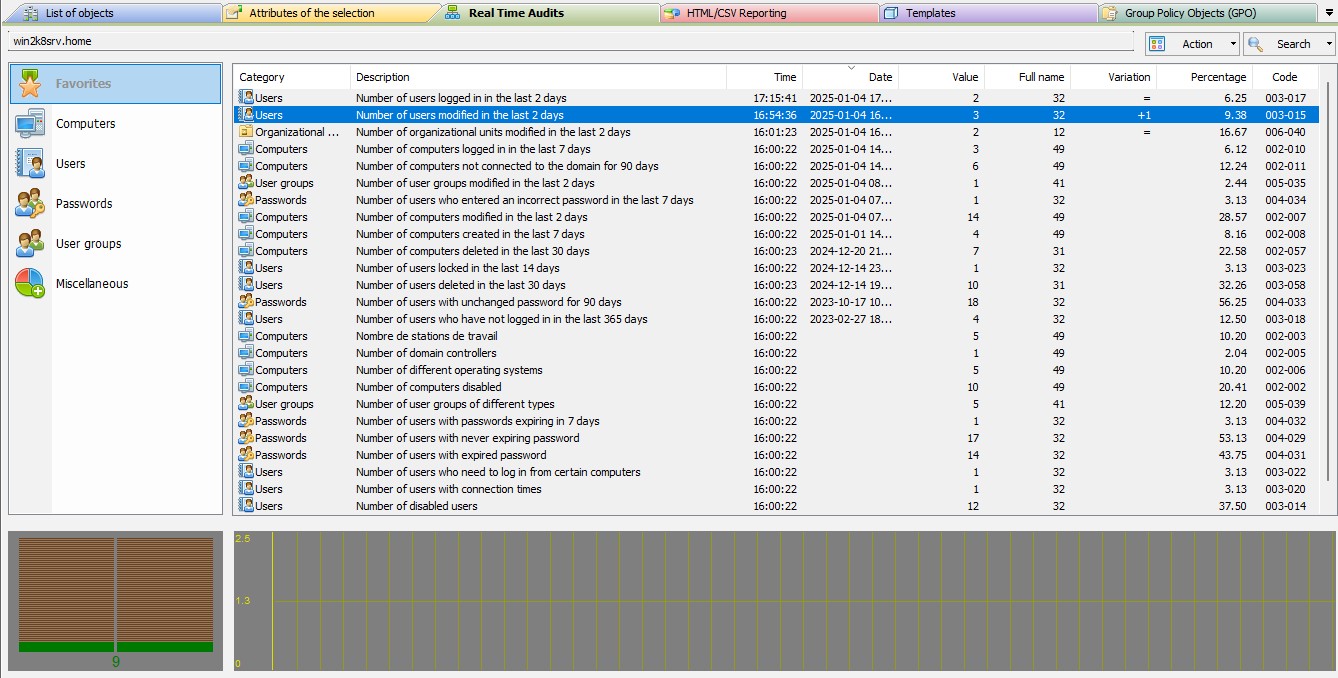
You can easily stop the Real Time Audits for an Active Directory domain by selecting the "Action" menu, "Stop". Your configuration is saved when the software is exited and will be taken into account during the next execution.

In the same way, you can restart the audit, by the "Action" menu, "Start".
Last modification: 01/13/2026

Previous
   
Next

Back to the list


FAQ : IDEAL ADMINISTRATION | IDEAL DISPATCH | IDEAL REMOTE | IDEAL MIGRATION


IDEAL ADMINISTRATION 26.0
DOWNLOAD
FREE 30-DAY TRIAL
Back to top