
 Français
 English
 Español
 Deutsch
 Italiano
 Русский

How to create a filter using a list of computers?
I want to limit the list of domain computers to a specific selection of machines, for example a few servers or the computers of a department spread across several organizational units. How do I create a filter from a list of computers?
In IDEAL Administration, a filter can be based on a list of computers that you define yourself. This is useful when the machines you want to group do not match an organizational unit, a computer type or a name pattern: a few critical servers, the computers of a department spread across several organizational units, etc.
To do this, go to the domain in question (default tab: My Domain), then click "Filter", "Configure". Check "Apply a filter", click "Add" (button to the right of the filter name), enter the filter name, and then "Add".
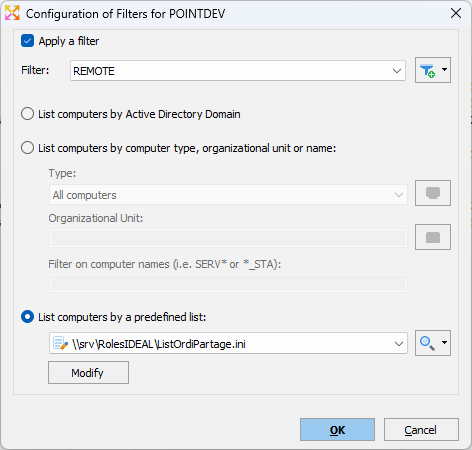
Then select the option "List computers by a predefined list". The menu of the magnifying glass button lets you build the list:
- "Servers", "Workstations" or "Others": add the domain computers of your choice, by type;
- "Use a network file": the list is saved in a file stored on a network share (for example \\server\share\list.ini), so that several administrators can work on the same list;
- "Clear the list": empties the list so you can start over.
The "Modify" button then lets you complete or update the list of computers.
Finally, click "OK". Only the computers in the list are then displayed. The selected filter is saved for the tab in question and will be automatically applied the next time the application is launched.