


 Français
 Español
 Deutsch
 Italiano
 Русский
How to deploy an MSI installation file on your network?
How to deploy an MSI installation file on your network?
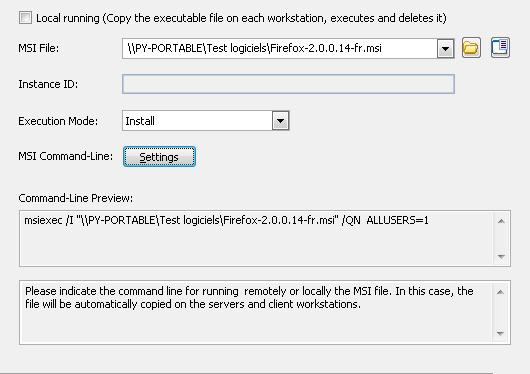
This action ( ) allows to select an MSI (Microsoft Service Installer) file that should be executed on servers and workstations. Like the script action, this execution can be remote or local.
By default, the MSI file to execute will be considered as remote.
From this action, you can do several kinds of execution: install, uninstall, repair, administrative install, announce a product.
- Remote execution:
Remote execution means that the MSI file is located on another computer of the network and that it needs to be executed remotely using his network path.
For example: \\POINTDEV\MysharedScript\script.msi.
- Local execution:
Local execution means that the MSI file is automatically copied on all servers and workstations concerned by the distribution during the installation phase, and removed at the end of execution.
IMPORTANT: The MSI file copied is automatically removed at the end of execution.
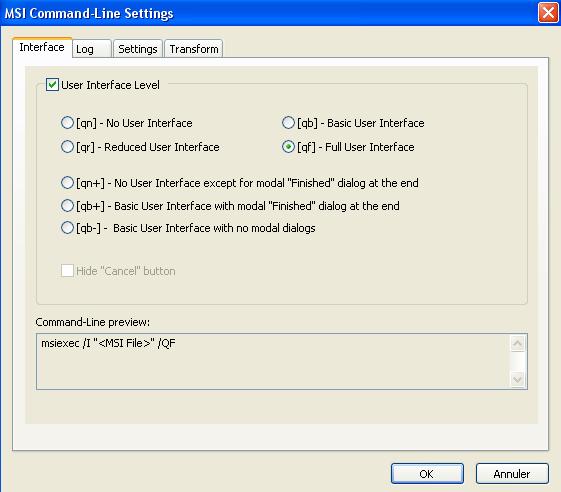
It is also possible to easily generate and MSI command from the wizard.
You only need to click on "Settings".
Examples:
Remotely installing Open Office with an MSI
Remotely installing Office Professional 2003 with an MSI