


 Français
 Español
 Deutsch
 Italiano
 Русский
How to deploy the copy, delete, or edit of a file or folder on a network?
How to deploy the copy, delete, or edit of a file or folder on a network?
From this action, you can copy ( ), move (
 ) or delete (
 ) a file or a folder on all selected computers.
It is also possible to edit /read ( ) any kind of file (.txt, .doc,.wav, .avi, .ppt, .html, .xsl …).
- Local copy :
The local copy means that the file or folder is copied in a transition folder during the installation phase, and then moved to its destination directory during the execution phase.
- Remote copy :
The remote copy means that the file or folder is copied in its destination folder during the execution phase.
Each computer performs a copy command..
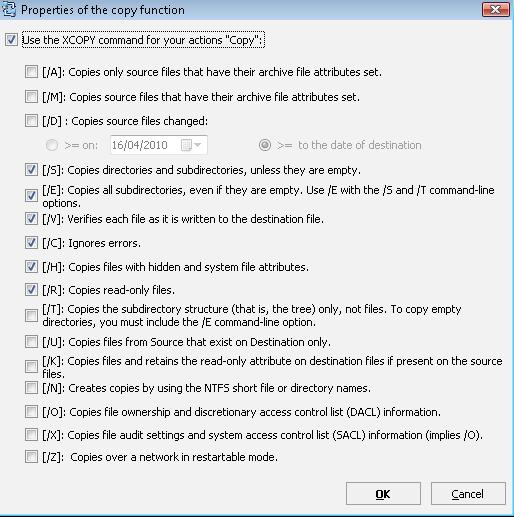
You can also set your XCOPY command:
Environment variables used for the assigning a destination path:
%ALLUSERSPROFILE%: Path of the common user profile path.
%APPDATA%: Path of application data for the current user.
%CommonProgramFiles%: Common files directory for the Program Files directory.
%HomeDrive%: Primary local drive.
%HomePath%: User default folder.
%ProgramFiles%: Program Files folder.
%SystemDrive%: Local system drive.
%SystemRoot% and %windir%: Folders containing Windows system files.
%TEMP% and %TMP%: Folders containing temporary files of active session.
%UserProfile%: User profile path.
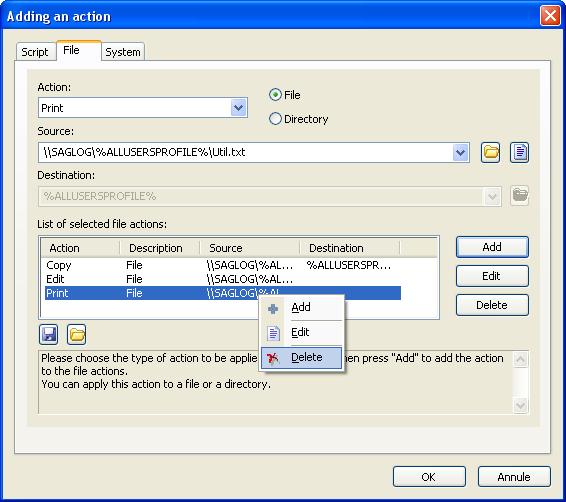
Examples :
Copy of a folder in a common directory on all computers
Copy of a file in the same directory on all computers