


 Français
 Español
 Deutsch
 Italiano
 Русский
How to use the RustDesk remote control tool in IDEAL REMOTE?
Is RustDesk integrated into IDEAL REMOTE? If so, how does it work?
Yes,
Version 26.5 (and later) of IDEAL REMOITE integrates the modern RustDesk remote control solution.
To use RustDesk from IDEAL REMOTE, select the main menu Remote Desktop \ RustDesk Remote Desktop, or right-click on a computer in your organization and choose Remote Desktop \ RustDesk Remote Desktop.
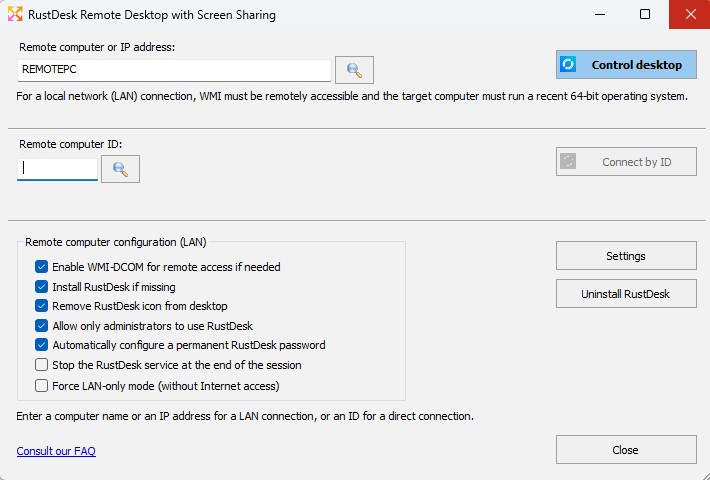
➡️ What is RustDesk in IDEAL REMOTE?
RustDesk is a modern remote control solution, natively integrated into IDEAL REMOTE starting from version 26.5.
It complements the existing solutions:
- TightVNC
- Microsoft RDP
- RDP Shadow
RustDesk notably enables remote control:
- on recent Windows systems
- over the local network (LAN)
- outside the corporate network (remote work, mobile computers)
➡️ Why add RustDesk when TightVNC already exists?
TightVNC remains a simple and efficient solution, still available in IDEAL REMOTE.
However, RustDesk brings several major improvements:
- modern encrypted communications
- full compatibility with Windows 10 / 11 and recent servers
- connection possible outside the local network
- operation based on a unique identifier (ID)
- better suited to modern usage (mobility, remote work)
RustDesk does not replace TightVNC;
it is a modern alternative, depending on the usage context.
➡️ Do you need to manually install RustDesk on workstations?
No.
IDEAL REMOTE allows:
- automatic remote installation of RustDesk
- without GPO
- without prior deployment
- without user intervention
The installation can be performed:
- only if RustDesk is missing
- per workstation or in bulk
➡️ Is an agent permanently installed?
No.
IDEAL REMOTE keeps its philosophy:
- no proprietary agent
- no permanent IDEAL service
- no additional infrastructure
RustDesk is installed only when necessary, and can be:
- started on demand
- automatically stopped after the session
- fully uninstalled if desired
➡️ Which systems are supported?
RustDesk is intended for recent systems:
- Windows 10 64-bit and later
- Windows 11
- Recent Windows Server versions
For older Windows systems, IDEAL REMOTE continues to offer:
- TightVNC
- RDP
- RDP Shadow
How does a RustDesk connection work?
Two modes are available.
➡️ LAN mode – Connection by computer name
In this mode:
- IDEAL REMOTE contacts the remote computer via WMI
- installs RustDesk if necessary
- starts the RustDesk service
- automatically retrieves the ID
- launches the remote control session
This mode also allows:
- Windows firewall management
- service creation and removal
- full session automation
➡️ ID mode – Off-network connection
This mode allows remote control:
- without direct network access
- without WMI
- without administrative shares
- without dependency on Active Directory
You only need:
- the RustDesk ID of the remote computer
This mode is ideal for:
- remote work
- laptops
- non-domain computers
- external support
➡️ What is the RustDesk ID used for?
The ID is the unique identifier of the RustDesk computer.
It allows:
- a stable connection even if the IP address changes
- remote control outside the local network
- unique identification of the computer
IDEAL REMOTE can:
- automatically retrieve the ID
- request the ID manually if needed
- store the ID in the database for future connections
➡️ Can the ID change?
Generally, no.
The ID remains the same as long as:
- RustDesk is not fully uninstalled
- the configuration files are not removed
In the case of a full system reinstallation, the ID may be regenerated.
➡️ Are the ID and the computer name linked?
Yes.
IDEAL REMOTE establishes a bidirectional mapping:
- if the computer name is known ? the ID is automatically filled in
- if the ID is known ? the computer name is automatically displayed
This allows:
- minimal input
- fewer errors
- fast remote control
➡️ Do you need to know a RustDesk password?
RustDesk manages authentication itself.
The password can be:
- requested from the remote user
- stored on the administrator workstation
- defined according to the RustDesk policy
IDEAL REMOTE does not store any RustDesk passwords.
➡️ Does the user need to approve the connection?
This depends on the RustDesk configuration of the remote computer:
- attended mode: the user approves the connection
- unattended mode: the connection is possible if the password is known
IDEAL REMOTE fully respects the local RustDesk configuration.
➡️ Does the RustDesk service start automatically?
The RustDesk service can be:
- installed automatically
- configured for automatic startup
However, for security reasons:
- RustDesk does not always start immediately after boot
- the service is usually started on demand by IDEAL REMOTE
This is intentional behavior of the RustDesk product.
➡️ Why doesn’t the service start after reboot?
RustDesk prioritizes security:
- no permanent network listening
- no unintended exposure of the computer
- controlled startup only when needed
IDEAL REMOTE therefore starts the service:
- for each LAN session
- and can automatically stop it at the end of the session
➡️ What does the “Stop the service at the end of the session” option do?
This option allows:
- stopping the RustDesk service after remote control
- reducing the system exposure surface
- applying a stronger security policy
It is equivalent to what already existed with TightVNC.
➡️ Can the RustDesk icon be removed?
Yes.
IDEAL REMOTE can automatically:
- remove the desktop icon after installation
This avoids any confusion for end users.
➡️ Are firewall rules modified?
Yes, only if necessary.
IDEAL REMOTE can automatically enable:
- WMI
- DCOM
- Remote administration
- File sharing (C$)
These are standard Microsoft-provided rules; no exotic rules are added.
No inbound rule specific to RustDesk is created.
➡️ Can WMI be enabled even if it does not respond?
Yes.
IDEAL REMOTE can:
- create a remote process via RPC
- enable the required firewall rules
- make WMI accessible automatically
This provides a very reliable administration “bootstrap”.
➡️ Does RustDesk work without Internet?
Yes, in LAN mode.
In ID mode outside the network, RustDesk uses its identifier-based connection mechanism.
No external IDEAL REMOTE server is required.
➡️ Can RustDesk be uninstalled remotely?
Yes.
IDEAL REMOTE allows:
- retrieval of the MSI GUID
- silent uninstallation
- service removal
- system cleanup
The uninstallation can be performed:
- individually
- or in bulk
➡️ Are actions visible during execution?
Yes.
The RustDesk dialog displays:
- progress messages
- performed actions
- any errors
Tasks are executed in a separate thread to ensure the application is never blocked.
➡️ Is RustDesk mandatory?
No.
RustDesk is an optional feature.
Administrators can continue to use:
- TightVNC
- RDP
- RDP Shadow
depending on systems and requirements.
✅ Summary
The integration of RustDesk into IDEAL REMOTE provides:
- modern and secure remote control
- LAN and off-network operation
- fully automated installation
- no cloud dependency
- no additional infrastructure
- strict compliance with Windows security
- agentless administration remains unchanged
RustDesk integrates naturally into IDEAL REMOTE,
without changing its philosophy:
simplicity, security, control, and efficiency for system administrators.