
 English
 French
 Spanish
 German
 Italian
 Russian

Espace Reva
2 allée Josime MARTIN
13160 CHATEAURENARD
FRANCE
Tel : 33 9 77 63 61 94
Fax : 33 4 32 62 71 35 Tel: 33 9 77 63 61 94

FAQ : IDEAL ADMINISTRATION
Manage your Windows Active Directory environments and Workgroups from a single consoleWith IDEAL ADMINISTRATION 2026, Active Directory administration becomes even more comprehensive. Proactive detection, intelligent alert analysis powered by Cloud AI, decision support, and now secure remote control with RustDesk, all agentless, for centralized, efficient, and fully controlled administration. ⬇️ 30-day free version.
How to use the RustDesk remote control tool in IDEAL ADMINISTRATION?How to use the RustDesk remote control tool in IDEAL ADMINISTRATION? |
Is RustDesk integrated into IDEAL ADMINISTRATION? If so, how does it work? |
|
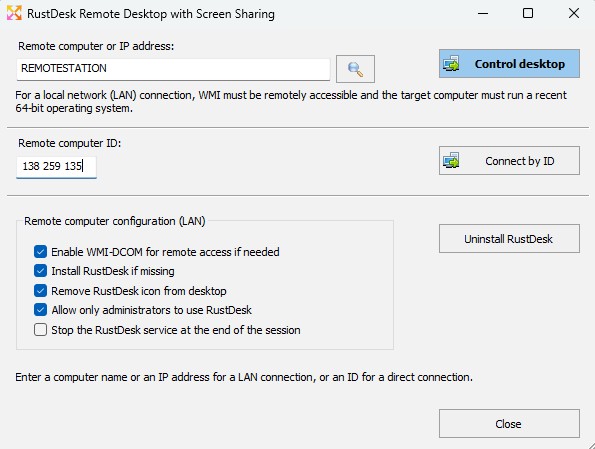
Yes, Version 26.5 (and later) of IDEAL ADMINISTRATION integrates the modern RustDesk remote control solution. To use RustDesk from IDEAL ADMINISTRATION, select the main menu Remote Desktop \ RustDesk Remote Desktop, or right-click on a computer in your organization and choose Remote Desktop \ RustDesk Remote Desktop.
➡️ What is RustDesk in IDEAL ADMINISTRATION?RustDesk is a modern remote control solution, natively integrated into IDEAL ADMINISTRATION starting from version 26.5. It complements the existing solutions:
RustDesk notably enables remote control:
➡️ Why add RustDesk when TightVNC already exists?TightVNC remains a simple and efficient solution, still available in IDEAL ADMINISTRATION. However, RustDesk brings several major improvements:
RustDesk does not replace TightVNC; ➡️ Do you need to manually install RustDesk on workstations?No. IDEAL ADMINISTRATION allows:
The installation can be performed:
➡️ Is an agent permanently installed?No. IDEAL ADMINISTRATION keeps its philosophy:
RustDesk is installed only when necessary, and can be:
➡️ Which systems are supported?RustDesk is intended for recent systems:
For older Windows systems, IDEAL ADMINISTRATION continues to offer:
How does a RustDesk connection work? Two modes are available. ➡️ LAN mode – Connection by computer nameIn this mode:
This mode also allows:
➡️ ID mode – Off-network connectionThis mode allows remote control:
You only need:
This mode is ideal for:
➡️ What is the RustDesk ID used for?The ID is the unique identifier of the RustDesk computer. It allows:
IDEAL ADMINISTRATION can:
➡️ Can the ID change?Generally, no. The ID remains the same as long as:
In the case of a full system reinstallation, the ID may be regenerated. ➡️ Are the ID and the computer name linked?Yes. IDEAL ADMINISTRATION establishes a bidirectional mapping:
This allows:
➡️ Do you need to know a RustDesk password?RustDesk manages authentication itself. The password can be:
IDEAL ADMINISTRATION does not store any RustDesk passwords. ➡️ Does the user need to approve the connection?This depends on the RustDesk configuration of the remote computer:
IDEAL ADMINISTRATION fully respects the local RustDesk configuration. ➡️ Does the RustDesk service start automatically?The RustDesk service can be:
However, for security reasons:
This is intentional behavior of the RustDesk product. ➡️ Why doesn’t the service start after reboot?RustDesk prioritizes security:
IDEAL ADMINISTRATION therefore starts the service:
➡️ What does the “Stop the service at the end of the session” option do?This option allows:
It is equivalent to what already existed with TightVNC. ➡️ Can the RustDesk icon be removed?Yes. IDEAL ADMINISTRATION can automatically:
This avoids any confusion for end users. ➡️ Are firewall rules modified?Yes, only if necessary. IDEAL ADMINISTRATION can automatically enable:
These are standard Microsoft-provided rules; no exotic rules are added. No inbound rule specific to RustDesk is created. ➡️ Can WMI be enabled even if it does not respond?Yes. IDEAL ADMINISTRATION can:
This provides a very reliable administration “bootstrap”. ➡️ Does RustDesk work without Internet?Yes, in LAN mode. In ID mode outside the network, RustDesk uses its identifier-based connection mechanism. No external IDEAL ADMINISTRATION server is required. ➡️ Can RustDesk be uninstalled remotely?Yes. IDEAL ADMINISTRATION allows:
The uninstallation can be performed:
➡️ Are actions visible during execution?Yes. The RustDesk dialog displays:
Tasks are executed in a separate thread to ensure the application is never blocked. ➡️ Is RustDesk mandatory?No. RustDesk is an optional feature. Administrators can continue to use:
depending on systems and requirements. ✅ SummaryThe integration of RustDesk into IDEAL ADMINISTRATION provides:
RustDesk integrates naturally into IDEAL ADMINISTRATION,without changing its philosophy:
|
| Last modification: 02/02/2026 |


IDEAL ADMINISTRATION 26.0
DOWNLOADFREE 30-DAY TRIAL
SOFTWARE
SERVICES
SITEMAP
POINTDEV
ESPACE REVA2 ALLEE JOSIME MARTIN
13160 CHATEAURENARD
FRANCE


