FAQ : IDEAL DISPATCH

Stellen Sie Ihre IT-Aktionen remote bereit, führen Sie sie aus und steuern Sie sie über eine einzige Oberfläche

Suche Hilfe  

FAQ

By using this search engine, you can search one or more terms in the complete Pointdev FAQ.

  • In order to look for one or more keywords, type them in the search field using space to separate them.

    ex : remote control

    This search will show you every FAQ containing the word "remote" OR "control".

  • In order to look for a full sentence, use the quotes " " around your keywords
  • ex : "remote control"

    This search will show you every FAQ containing the whole word "remote control".


 Titel und Inhalt
 Nur titel

IDEAL ADMINISTRATION 2026 ist verfügbar!

Mit IDEAL ADMINISTRATION 2026 erreicht die Active-Directory-Verwaltung eine neue Stufe. Diese Version legt den Schwerpunkt auf proaktive Erkennung, intelligente Analyse von Warnmeldungen mithilfe von Cloud-KI sowie Entscheidungsunterstützung und bewahrt gleichzeitig Einfachheit, Effizienz und eine agentenlose Verwaltung. ⬇️ 30-Tage-Gratisversion.


Some examples of deployments by using IDEAL Dispatch

Executable Action: How to remotely install 7Zip?

Example n°4: Installing 7Zip locally

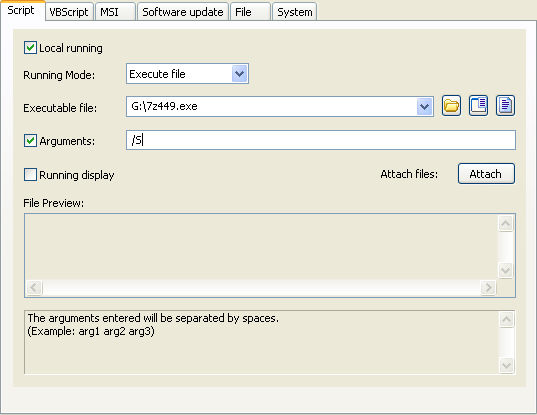
Running locally means that the 7z449.exe program must be copied to all servers and workstations involved in the distribution.

You must configure the following arguments:

  • Check the Local running checkbox.
  • Select the type of action: Executable File.
  • Indicate the path of the executable file: G:\7z449.exe
  • Check the Arguments checkbox and enter: /S
Letzte Änderung: 04/10/2017

Previous
   
Next

Zurück zur Liste


FAQ : IDEAL ADMINISTRATION | IDEAL DISPATCH | IDEAL REMOTE | IDEAL MIGRATION


IDEAL DISPATCH 9.9
KOSTENFREIER DOWNLOAD
Zurück zum Anfang